Hammer AI – Features, Pricing, Privacy, and Alternatives
Published: 23 Jan 2026
Hammer AI has gained attention across the tech and creative space because it focuses on privacy-friendly AI interaction and flexible usage options. In this guide, we’ll walk through everything you need to know, including how it works, its main features, who it’s best for, and how it compares to similar tools.
By the end, you’ll have a clear picture of whether this platform fits your needs and how you can use it effectively.If you’re intersten any other tools, please check out my guide on Neon lights AI.
What Is Hammer AI?
Hammer AI is a freemium AI chat platform that allows users to have unlimited conversations, even on the free plan, which is one of its most talked-about features. It is known for giving users the choice between running AI models locally on their own device or using cloud-based models, depending on their needs.
This setup helps users who care about privacy, since local chats can work without sending data online. The platform also supports custom characters and creative interactions, making it popular among writers and roleplay users. Paid plans are optional and mainly add access to stronger cloud models and expanded features, while the core experience remains available for free through Hammer AI.
Key Features of Hammer AI
Hammer AI stands out because it gives users more control, privacy, and creative freedom than many similar tools. Below are the key features that make it popular among writers, role-players, and privacy-focused users, based only on documented capabilities from official and review sources.
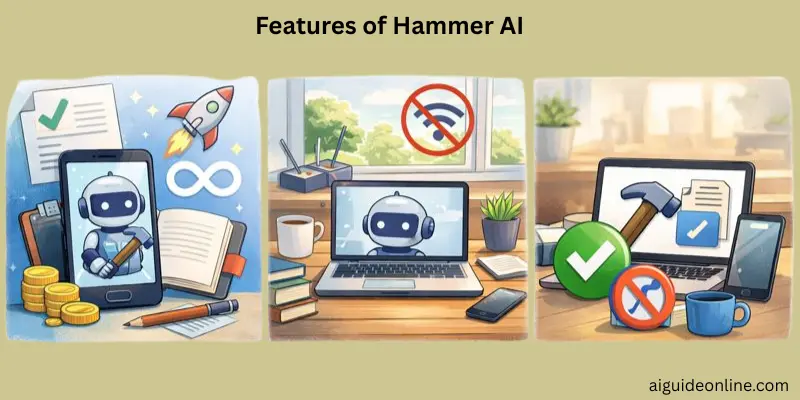
- Free and unlimited use – You can chat without limits using local AI models, with no daily caps or forced upgrades.
- Works fully offline – Once installed and a model is downloaded, the app runs without an internet connection.
- No sign-up required – You can start using it immediately, with no account, login, or email needed.
- Strong privacy by design – Chats stay on your device in local mode and are not stored externally.
- Desktop support – Available for macOS (Apple Silicon), Windows, and Ubuntu/Linux.
- Automatic GPU detection – The app detects and uses your GPU automatically for better performance.
- Multiple AI models supported – Includes support for several open-source language models users can choose from.
- Character chat and story mode – You can chat with specific characters or write stories together with the AI.
- Character card imports – Supports both V1 and V2 character card formats for customization.
- Group chats – Allows conversations with up to 10 characters in a single chat.
- Image generation – Includes built-in image generation during chats or from a dedicated section.
- NSFW support (optional) – Uncensored models are available for users who enable them, mainly for roleplay use.
How Hammer AI Works
Hammer AI gives users flexibility by letting them choose how and where their AI models run, depending on their needs. In this section, we explain the key technical choices users can make and where Hammer AI can be used based on its design and documented capabilities.
Local vs. Cloud Models
Hammer AI lets you run AI language models in two main ways: locally on your own device or via cloud-hosted servers. When you use local models with the desktop app, everything runs directly on your computer without an internet connection, and your messages stay private on your machine.
If you choose cloud models, your conversations are processed on secure servers, giving you access to more powerful AI while remembering that the processing happens online.
Platforms It Supports
Hammer AI supports multiple desktop platforms so users can run it on their own computers. The desktop edition works on macOS (including Apple Silicon), Windows, and several Linux versions, letting you use local AI models right from your device.
The web version also lets you use Hammer AI from a browser if you prefer cloud models, giving flexibility in how and where you chat or write with AI.

Use Cases of Hammer AI & Who It’s For
Hammer AI is used by people for different creative and interactive tasks because it supports private chats and multiple content tools. Below are the main ways people use it and who finds it most useful, based on documented features and real user experiences.
Use Cases:
- Chat and roleplay: Users enjoy unlimited conversations with customizable AI characters for casual chat or immersive roleplay scenarios.
- Creative writing: Writers use Hammer AI to co-write stories, build world lorebooks, and explore narrative ideas with AI assistance.
- Generate art and visuals: The platform includes tools for generating unique images through prompts, useful for creative content and visualization.
Who It’s For:
Hammer AI is ideal for people who want private and flexible AI interaction without heavy restrictions, especially creative users, roleplay lovers, and anyone looking for engaging chats without sign-up barriers or cost.
Plans & Pricing
Hammer AI offers a clear pricing structure that starts with a completely free tier and gives users the option to upgrade if they want more advanced features. You can begin using the core tools without paying anything, and paid plans unlock extra capabilities like access to cloud models, enhanced memory, and premium support.
Free Plan – $0 per month
- Unlimited conversations and characters
- Access to all local LLMs
- Unlimited messages and basic context size (industry standard limits)
- No sign-in required, privacy by design
Starter Plan – around $9 per month
- Everything in the free plan
- Access to cloud LLMs
- Private Discord access and prioritized feature requests
- Enhanced context handling for longer conversations
Advanced Plan – around $18 per month
- All Starter features
- More powerful cloud models
- Larger memory and context size for deeper chats
- Additional image generation capacity
Ultimate Plan – around $35 per month
- Full access to premium cloud LLMs
- Maximum context size and advanced AI capabilities
- Best choice for users who want the highest performance and flexibility
Paid plans mainly improve cloud AI access, memory size, and creative tools, while the free tier remains robust for local offline use without restrictions.
Hammer AI Experience — User Impressions
Many users appreciate Hammer AI for its privacy focus and local-first design, reporting that it feels solid and dependable for personal chats and creative use without unnecessary data leaving their devices. Long-term users on Reddit have said they continue enjoying the app over weeks of use and recommend trying the free version, noting the setup is intuitive and chats generally work well once characters are imported properly.
At the same time, some community feedback points out areas for improvement, such as a smaller character library compared with larger cloud platforms, occasional context loss in longer conversations, and reliance on external platforms like Discord for documentation. These impressions show that while many find Hammer AI fun, private, and flexible for AI roleplay and storytelling, there are also usability and feature gaps users would like to see addressed.
How Hammer AI Compares With Other Tools
When comparing Hammer AI with other AI chat and companion platforms, a few clear differences stand out based on documented feature sets and design choices. Hammer AI focuses strongly on privacy, offline capability, and customization, while many other platforms prioritize mobile use, social chat features, or cloud-based convenience rather than local control.
Hammer AI vs. Chai
Hammer AI emphasizes privacy and flexibility by letting users run models locally on desktop without needing an internet connection, and no login is required to start chatting. In contrast, Chai is mobile-first, requires an active internet connection, and stores chats online, making it more suited to quick, social interactions rather than privacy-focused or offline storytelling.
Hammer AI vs. Character.AI
Compared with Character.AI, Hammer AI gives users the option to process conversations locally and control data on their own device, which can appeal to users who care about privacy and offline use. Character.AI, on the other hand, runs entirely online and stores conversations on external servers, trading off privacy for easier cloud access and broad character libraries. Both platforms offer free use, but Character.AI also includes paid premium features for expanded access.
Hammer AI vs. Other Chat Platforms
In the broader landscape, many AI chat tools rely on an internet connection and cloud hosting, whereas Hammer AI’s ability to work offline, avoid forced login, and let users customize AI characters deeply sets it apart. Other tools may emphasize ease of use or mobile access more heavily, but Hammer AI’s local model support and privacy-first design make it distinctive among AI companions.
Pros & Cons Of Hammer AI
In this section, we will look at the benefits and drawbacks of using Hammer AI based on real user feedback and documented features. This helps you understand what users like about it and where it could be better before you decide to try it yourself.
| Advantages |
|---|
|
| Disadvantages |
|---|
|
Conclusion
In this guide, we covered everything you need to know about Hammer AI, including how it works, its key features, real user impressions, use cases, and how it compares with other tools. We also looked at its strengths, like privacy-first design, offline use, and creative flexibility, along with its limits, such as fewer built-in characters and a more desktop-focused setup. All of these points reflect what users and official sources consistently highlight about the platform.
Honestly, guys, Hammer AI is worth trying if privacy, control, and creative freedom matter to you. It’s especially useful for folks who enjoy roleplay, storytelling, or private AI chats without logins or tracking. If that sounds like you, give it a shot and see how it fits your workflow. Stay tuned and keep learning — there’s always more to explore.
FAQs
Yes, Hammer AI lets you chat for free without paying for basic use, both with local models and cloud-hosted ones. Paid plans are optional and add extra features like larger context and image generation.
Yes, you can use Hammer AI offline if you download and run a model on your own device using the desktop app. It doesn’t need internet once set up.
Local mode runs AI directly on your computer so everything stays on your device, while cloud mode uses online servers for faster, more powerful responses. Local is private and offline; cloud requires internet.
Yes, Hammer AI supports creating custom characters with your own personalities and styles for chatting and storytelling.
Hammer AI supports desktop apps for Mac, Windows, and Linux, and you can also use it through web access in some browsers.
Your chats can be private, especially when running models locally on your device, and Hammer AI has privacy policies in place. Review the policy to understand how data is used.
You can access Hammer AI through a web browser on mobile devices, though its main desktop features are designed for Windows, Mac, and Linux.
It includes unlimited conversations, character creation, local and cloud models, privacy-focused chat, image generation, and story writing.
Some alternatives include other AI chat or companion tools like Character.AI, dippy.ai, and tipsy.chat, each with different strengths and traffic.
Yes, you can start chatting without creating an account or logging in, which is one of its privacy features.





- Be Respectful
- Stay Relevant
- Stay Positive
- True Feedback
- Encourage Discussion
- Avoid Spamming
- No Fake News
- Don't Copy-Paste
- No Personal Attacks
- Be Respectful
- Stay Relevant
- Stay Positive
- True Feedback
- Encourage Discussion
- Avoid Spamming
- No Fake News
- Don't Copy-Paste
- No Personal Attacks
