Pykaso AI Review 2026 – Features, Pricing & Pros
Published: 18 Feb 2026
AI tools that create images and videos are becoming a common part of online content creation. Many creators now rely on platforms that help them produce realistic visuals, train custom models, and generate videos in minutes.
In this guide, we will look closely at Pykaso AI, including its features, setup process, pricing, use cases, and alternatives. You will also see who it is best for and whether it fits your content goals. By the end, you will have a clear picture of what to expect and how it compares to other options. If you’d like to explore similar tools, take a look at my full guide on Winston AI.
What Is Pykaso AI?
Pykaso AI is a content creation tool made for making realistic images and videos quickly. It helps users turn simple ideas into visuals without long or complex steps. The tool includes features like character training, image editing, and video generation. People use Pykaso because it can keep visuals consistent and look high quality.
You can also enhance skin, change backgrounds, or convert pictures into prompts. It works well for creators, startups, and small teams that need visual content fast. Pykaso is mainly focused on visual work, so it is not a tool for things like email lists, customer tracking, or sales tools. Users can sign up and start making content in a short time.
How Pykaso AI Works
Pykaso AI helps you create realistic images and videos by using simple tools and prompts. You start with a description or a base image and the platform builds visuals around it. It also lets you train your own models and refine designs quickly without needing deep technical skills.
- Sign up and log in to your Pykaso AI account to access the dashboard and tools.
- Enter a prompt or upload an image to tell the system what kind of image or video you want to generate.
- Use the AI content tools like image generation, video creation, or LoRa model training to produce visuals.
- Adjust settings for things like image quality, character style, and detail to match your needs.
- Generate the final output and save your images or videos once they look the way you want.
- Use editing features such as skin enhancer, image-to-image conversion, and prompt converters to refine your content.

Key Features of Pykaso AI
Pykaso AI comes with a set of tools that help you make high-quality visual content in different ways. These features let you create images, videos, and trained characters without long steps or hard editing.
- Train your own LoRa AI models for consistent visual output.
- Generate ultra-realistic AI images quickly from prompts.
- Create 4K AI videos based on text or image inputs.
- Build consistent AI characters that look the same across visuals.
- Edit images with a single prompt using built-in tools.
- Convert regular images into usable AI prompts for further work.
AI Model Training & Character Consistency
Pykaso AI allows users to train their own LoRa models to create personalized visuals. This feature helps keep characters and styles consistent across different images and videos.
- Train your own LoRa AI model to create a specific character or visual style.
- Generate ultra-realistic images using the trained model.
- Keep the same face, look, and style across multiple images.
- Use consistent characters for social media, branding, or content series.
- Improve visual quality while maintaining the same identity in every output.
Advanced Image & Video Editing Tools
Pykaso AI includes advanced tools that go beyond simple image creation. It lets users enhance or edit visuals right inside the platform, including features like skin enhancement and image‑to‑image conversion. These tools help refine visuals so they look more polished and professional.
The platform also supports video generation and quality enhancement, so creators can produce realistic 4K AI videos without needing separate software. These options make it easier to turn rough ideas into finished content in one place, whether for social media posts, promotional visuals, or creative projects.
Use Cases of Pykaso AI
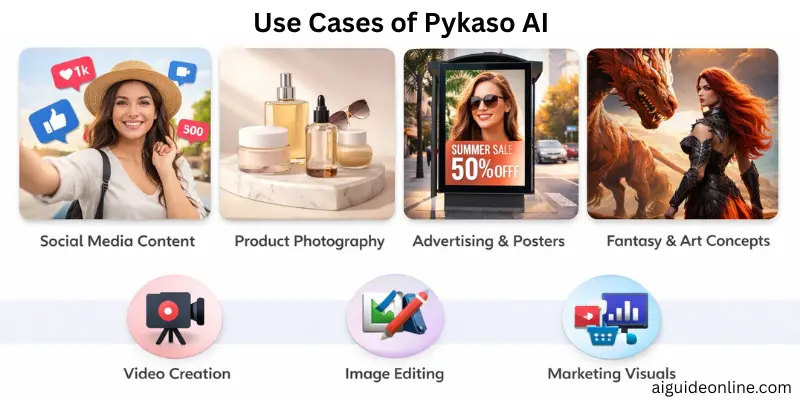
Pykaso AI is useful for people and businesses that need visual content fast and with good quality. It fits different creative needs, from personal projects to professional marketing work.
- Create consistent visual characters: Users can train models so the same character looks the same across images and videos.
- Generate realistic images: Quickly make high quality images from simple prompts.
- Produce AI videos: Turn text or descriptions into custom video clips without complex editing tools.
- Enhance images: Use tools like skin enhancement and editing to improve photos.
- Support visual content for social media: Creators and small teams can generate visuals for posts or campaigns.
Pricing Plans & Value for Money
Pykaso AI offers pricing options that let you test the platform before paying and choose a plan that fits your needs. The plans are designed for different levels of use, from casual creators to regular content makers.
| Plan | Price | What You Get |
| Free Trial | Free (trial period) | Try features and generate content during the trial |
| Starter Plan | From $9.99/month | Access to AI content tools and basic features |
The Starter plan gives you more use beyond the trial and is meant to help you create more visuals without limits once you subscribe.
Pros and Cons of Pykaso AI
In this section, we will look at the pros and cons of using Pykaso AI. This will help you decide if it fits your needs and workflow. Here’s a clear list of what’s good and what might be challenging.
| Advantages of Pykaso AI |
|---|
|
| Disadvantages of Pykaso AI |
|---|
|
Pykaso AI Alternatives
If you are looking for other tools that help with visual content, design, or video creation, there are several options worth considering. These alternatives offer similar creative features and may fit different needs or budgets.
Adobe Firefly
Adobe Firefly focuses on creative design with text‑to‑image capabilities and strong style control. It integrates well with other Adobe tools if you already use Photoshop or Illustrator. It works for graphics, backgrounds, and art assets for social posts or marketing.
Midjourney
Midjourney generates images from natural language prompts with a focus on artistic and stylistic visuals. It is widely used by creators who want unique art or character visuals with a specific artistic flair. It does not offer a free trial but is known for strong community‑driven styles.
Canva
Canva is a visual design suite that helps you make graphics, presentations, and simple image creations. It includes templates, stock visuals, and basic generation tools, making it easy for non‑designers. It also offers free and paid plans.
Synthesia
Synthesia is a video generator that uses digital avatars and text‑to‑video tools. It is useful if your focus is video content rather than still images. Brands often use it for video outreach, training clips, or marketing content.
Relevance AI
Relevance AI helps build and manage AI tools that support business needs and data use. It’s more focused on building workflow and AI agents rather than just creative visuals. This makes it useful if you need structured AI support beyond image or video creation.
Conclusion
To wrap things up, we’ve covered everything about Pykaso AI, from how it works to its pricing, features, and alternatives. This tool is ideal for creators and small teams who want to generate realistic images and videos quickly, saving time while keeping quality high.
If you’re looking to make your visual content stand out, I’d recommend giving Pykaso AI a try and exploring its features for your projects—it can really boost creativity and productivity. Keep experimenting, guys, and don’t hesitate to test the alternatives too. Stay tuned for more tips and reviews, buddies!
FAQs
Many users find Pykaso AI easy to use with fast content generation and good image quality, especially for character creation and visuals. Some reviews praise its tools and realistic results, while others mention occasional issues or complaints about pricing. Whether it’s worth it depends on how often you plan to create visuals and how you value those features.
Pykaso AI uses advanced models to turn prompts or images into photorealistic visuals like characters, images, and videos. You sign up, get free Gems, then use your Gems to run tools that generate or edit content. The system trains custom models and applies editing features based on what you request.
Pykaso AI is built by a team focused on giving creators tools to make and grow AI content, especially for influencers. It is developed and maintained by the company behind the pykaso.ai platform, though specific individual ownership is not detailed on public pages.
Pykaso AI doesn’t use a monthly subscription model. Instead, you purchase Gems, which are credits used to generate visuals. Packages start from around $6 for basic Gems and go up to larger bundles for more usage.
Yes, new users receive a small number of free Gems when they sign up, so you can try features before buying more. After using those free Gems, you will need to purchase more to access premium tools and full usage.






- Be Respectful
- Stay Relevant
- Stay Positive
- True Feedback
- Encourage Discussion
- Avoid Spamming
- No Fake News
- Don't Copy-Paste
- No Personal Attacks
- Be Respectful
- Stay Relevant
- Stay Positive
- True Feedback
- Encourage Discussion
- Avoid Spamming
- No Fake News
- Don't Copy-Paste
- No Personal Attacks
