Imagine Explainers: Create Videos Easily in 2026
Published: 27 Feb 2026
Over 80 percent of people prefer watching a short video instead of reading long text. That shift has changed how creators share ideas online. This is where imagine explainers steps in and solves a real problem.
I have tested imagine explainers for different projects, from blog summaries to training videos. It turns simple text into clear, watchable videos in minutes. I saw faster engagement and better watch time after using it. If you create content in 2026, tools like imagine explainers are no longer optional. They save time and help you stay ahead. If you want to discover more tools like this, check out my complete guide on Pykaso AI.
What is Imagine Explainers?
It is an online tool that turns written text into short, ready to share videos. I use imagine explainers to convert blog posts, scripts, and lesson notes into simple visual content. The platform reads the topic, builds scenes, adds voice, and creates a complete video in minutes. In 2026, many creators use imagine explainers to save time and publish faster. From my own use, it works best for explainers, social media clips, and quick training videos.
How Imagine Explainers Works
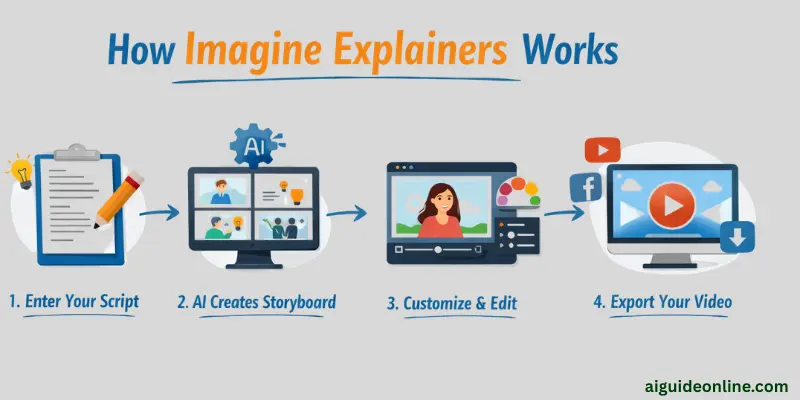
Creating videos with Imagine Explainers is simple and user-friendly. The platform guides you step by step, making video production fast and clear for anyone.
- I sign in and paste my text, blog post, or topic into the editor.
- The tool reads my content and breaks it into small video scenes.
- It selects matching visuals, background clips, and simple animations.
- I choose a voice style and the system adds clear voiceover.
- I adjust text size, colors, or logo if I want custom branding.
- I preview the full video to check flow and timing.
- I export the final video in HD and upload it to YouTube, social media, or my website.
Key Features of Imagine Explainers
Using Imagine Explainers makes creating videos easier and faster. It offers tools that help you produce clear, engaging content without extra hassle. Here are the main features I noticed while using it in 2026.
- Text to video conversion: I paste my article or script, and the tool turns it into a short video within minutes. It creates scenes that match my topic.
- Ready made video templates: It gives simple templates for business, education, and social media. I just pick one and adjust small details.
- Automatic voiceover: It adds clear voice narration without extra tools. I choose the voice style that fits my audience.
- Scene and image matching: It selects visuals that fit my text. I can replace any image if I want more control.
- Flexible video length: I control how long the video should be. I use short clips for Instagram and longer ones for YouTube.
- Simple editing tools: I edit text, change colors, and adjust timing inside the same dashboard. I do not need extra software.
- Fast export options: It lets me download videos in high quality. I can share them directly on social platforms.
What Sets Imagine Explainers Apart?
Imagine Explainers stands apart because it keeps the process simple and fast. I have used many video tools, but this one feels easier from the first click. It reads plain text and builds clear scenes that match the message. In 2026, speed matters for creators, and this tool helps you publish in minutes. It focuses on clarity instead of complex editing steps.
From my own experience with Imagine Explainers, I spend less time fixing mistakes. The platform organizes content in a logical order without extra effort from me. It also allows quick edits if I want to adjust tone or length. Many tools require long setup time, but this one gets straight to the point. That practical design makes it different from most other video platforms I have tested.
Use Cases of Imagine Explainers
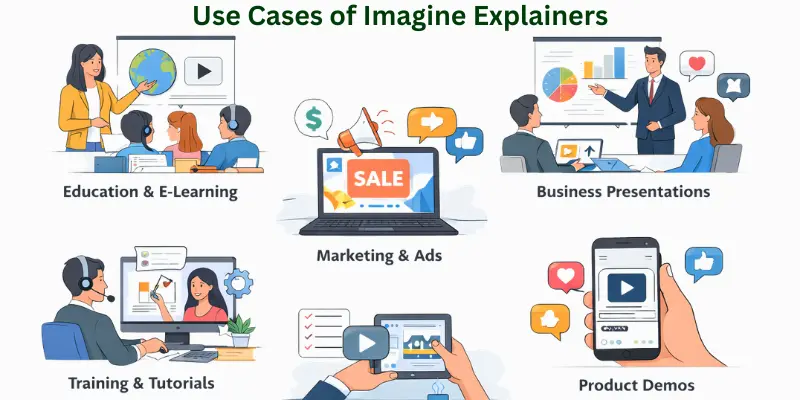
Use Cases of this tool can make ideas simple and easy to share. It works well for teaching, business, or any project where clear videos help people understand quickly.
- YouTube Content Creation: I turn blog posts into short YouTube explainer videos in minutes.
- Social Media Videos: I create quick Instagram, Facebook, and TikTok clips from simple text.
- Online Course Lessons: I convert lesson notes into visual videos for students.
- Corporate Training: I build simple training videos for staff without hiring editors.
- Product Demos: I explain product features in short, clear videos for websites.
- Blog to Video Repurposing: I reuse old articles by turning them into fresh video content.
- News and Trending Topics: I create fast updates on current events using short scripts.
- Startup Pitch Videos: I present business ideas in video format for investors.
- Client Content for Agencies: I deliver ready made video content for marketing clients.
- Nonprofit Awareness Campaigns: I create awareness videos that explain causes in simple words.
Who Uses Imagine Explainers?
I have worked with different types of users who rely on Imagine Explainers. From beginners to professionals, many people use it to create videos faster and easier.
- Content Creators: They turn scripts and blog posts into YouTube and social media videos.
- Teachers and Educators: They convert lesson notes into visual explainers for students.
- Online Course Creators: They build video lessons without hiring a video editor.
- Digital Marketers: They create promo videos and ad content for brands.
- Small Business Owners: They explain their products and services in short videos.
- Marketing Agencies: They produce client video content at scale.
- Startups: They create pitch and demo videos for investors.
- Coaches and Consultants: They share tips and training videos with their audience.
- Nonprofit Organizations: They spread awareness about causes through simple video stories.
- Freelancers: They offer text to video services to clients using the platform.
Pricing, Plans, and Value for Money
It gives good value for both beginners and professionals who want to create videos quickly.
| Plan Name | Price (Monthly) | Features Included | Best For |
| Starter | $19 | Basic video creation, 5 videos/month, standard templates | Beginners who create few videos |
| Professional | $49 | 20 videos/month, advanced templates, social media export | Content creators and small businesses |
| Enterprise | $99 | Unlimited videos, premium templates, priority support, team access | Agencies and large teams |
| Custom/Agency | Contact Sales | Fully tailored features, brand customization, dedicated support | Large organizations needing full control |
Pros and Cons of Imagine Explainers
we will look at the benefits and drawbacks of using Imagine Explainers. This will help you decide if it fits your video creation needs.
| Advantages of Imagine Explainers |
|---|
|
| Disadvantages of Imagine Explainers |
|---|
|
Imagine Explainers Alternatives
If you want different ways to turn ideas into videos, there are many tools besides Imagine Explainers. These alternatives give you options to find the best fit for your style and goals.
Alternatives to Imagine Explainers:
- Synthesia – Lets you create videos using virtual presenters and simple scripts.
- Vyond – Great for animated explainer videos with customizable characters.
- Powtoon – Offers ready-made templates for presentations and social media clips.
- Renderforest – Provides video, logo, and website creation all in one platform.
- Moovly – Lets you combine video, audio, and images for clear storytelling.
- Biteable – Fast tool to make short, engaging videos for marketing or education.
These alternatives work well depending on your goal, budget, and the type of video you want to produce.
Conclusion
In this guide, we have covered Imagine Explainers and how it can help you create clear, engaging videos quickly. While the tool offers many benefits, it may have some limits depending on your project size or style. You can manage these by exploring templates carefully and testing features before starting large projects. I hope this overview helps you understand its value and practical use in everyday work.
Don’t skip the next part of the FAQs, I hope you will find something more interesting, so don’t miss it. If you miss it, you may lose something new.
FAQs
Here are some of the most commonly asked questions related to the Imagine Explainers:
Imagine Explainers is a tool that converts text into engaging video content quickly. It helps you explain complex ideas in simple visual stories. Many educators, marketers, and content creators use it to save time while keeping videos professional.
The tool analyzes your text and generates a video storyboard automatically. You can choose scenes, characters, and voiceovers to match your content. This makes creating videos faster than traditional editing methods.
It is popular among teachers, small business owners, marketers, and online course creators. Anyone who wants to turn ideas into videos without heavy technical skills can use it. It helps improve communication and engagement with audiences.
The tool offers features like topic-to-video conversion, real-time updates, voiceover options, and a media library. It also allows editing scenes and customizing video length. These features help users create professional videos easily.
Yes, it is designed for beginners who want easy video creation. Its simple interface guides users through every step. You don’t need advanced technical or design skills to produce videos.
Absolutely. The platform allows businesses to create promotional videos, explainer ads, and product tutorials. It helps marketers present information clearly to customers and boost engagement.
Yes, there are several tools like Synthesia, Pictory, and Lumen5 that also convert text into videos. These alternatives offer similar features for content creators. Exploring them can help you find the best fit for your needs.
This tool offers flexible pricing plans depending on usage and features. Plans start from basic video creation to advanced options with unlimited exports. You can choose a plan that fits your budget and project size.
The tool makes lessons engaging by converting written content into visual stories. Students can understand complex topics faster. Educators can use Imagine Explainers to create interactive and memorable teaching materials.
Yes, it saves time, improves content quality, and increases audience engagement. You can produce multiple videos without needing expensive software or a team. Many users find Imagine Explainers to be cost-effective for long-term video projects.





- Be Respectful
- Stay Relevant
- Stay Positive
- True Feedback
- Encourage Discussion
- Avoid Spamming
- No Fake News
- Don't Copy-Paste
- No Personal Attacks
- Be Respectful
- Stay Relevant
- Stay Positive
- True Feedback
- Encourage Discussion
- Avoid Spamming
- No Fake News
- Don't Copy-Paste
- No Personal Attacks
