WriterHand Review 2026: Features, Pros & Cons
Published: 3 Mar 2026
Over 60 percent of students now use online writing tools to finish assignments faster. WriterHand has become one of the most searched free AI writing tools in 2026. I tested WriterHand myself for essays, blog drafts, and short stories. It gives quick results without asking for sign up or payment. From my experience, it works best for short and simple content. If you want fast drafts without spending money, WriterHand can help you start quickly. If you’re interested in similar tools, check out my complete guide on ImagineMe.
What Is WriterHand?
WriterHand is a free online writing tool that helps you create text in seconds. It works inside your browser, so you do not need to download anything. You enter a topic or short instruction, and WriterHand generates a draft for you.
It can write essays, blog posts, stories, and simple articles. Many students and beginners use WriterHand in 2026 because it does not ask for sign up.
I tested it myself and found it helpful for quick ideas. It does not replace your thinking, but it gives you a strong starting point. In simple words, WriterHand is a fast helper for basic writing tasks.
How WriterHand Works
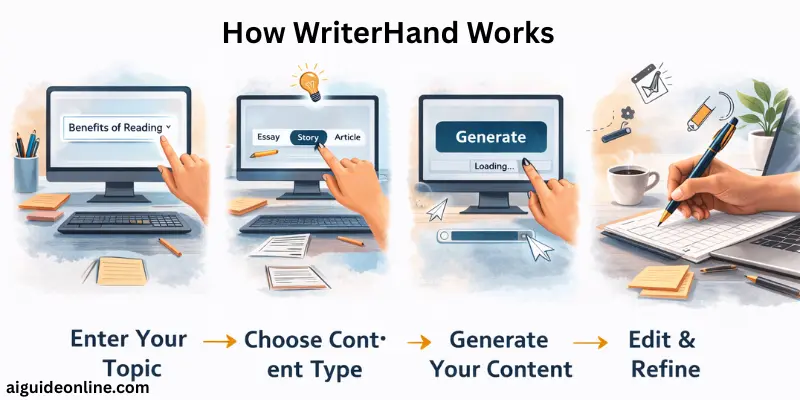
It works in a very simple way. You do not need any special skills to use it. I tried it myself, and the process felt quick and smooth from start to finish.
- Open the WriterHand website in your browser.
- Type your topic or question in the input box.
- Choose the type of content you want, such as essay or story.
- Adjust the creativity level if the option appears.
- Click the generate button to create your content.
- Wait a few seconds while the tool prepares your draft.
- Read the result and edit it to match your style or needs.
Key Features of WriterHand in 2026
It offers simple tools that help you write faster. I tested these features myself in 2026, and they work well for basic writing needs.
- Free to use without payment
- No sign up required
- Works directly in your browser
- Generates essays, blogs, and short stories
- Supports multiple languages
- Lets you adjust creativity level
- Gives quick results within seconds
- Simple and clean interface
- Easy copy and paste option
- Works well on mobile and desktop
Use cases of WriterHand
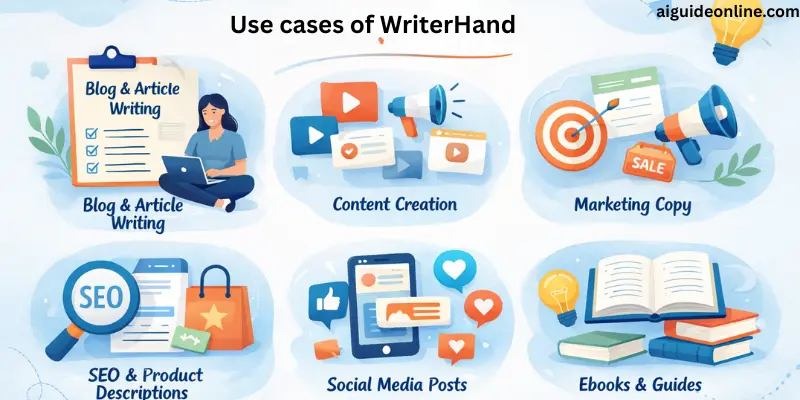
This helps in many everyday writing tasks. I tested it for different needs, and it works best for quick drafts and simple content.
- Write school and college essays in less time
- Create blog post outlines before writing full articles
- Generate short stories for practice or fun
- Draft product descriptions for small online stores
- Prepare simple social media captions
- Get ideas when you feel stuck
- Rewrite short paragraphs in a clearer way
- Create basic research summaries for beginners
Who Should Use WriterHand?
This tool works best for people who need quick drafts without spending money. I tested it in different situations, and it helps most when you want fast ideas and simple content.
- Students who need quick essay drafts for school work
- Bloggers who want fast outlines before writing full posts
- Beginners who struggle to start writing from scratch
- Non native English users who need basic sentence support
- Freelancers who want rough drafts for simple projects
- Social media users who need short captions or posts
- Anyone testing free writing tools before buying paid ones
What Makes WriterHand Different from Other AI Writers?
WriterHand stands out because it is simple and fast to use. You don’t need to create an account or pay to start writing. I found it easy to generate content quickly without extra steps. Unlike other tools, it works directly in your browser and supports multiple types of writing.
The interface feels clean, and beginners can start immediately. Even though it is basic, it helps you get drafts and ideas faster than many other writing tools. For someone like me who wants quick results, WriterHand saves time and keeps writing simple and clear.
Pros and Cons of WriterHand
In this section, we will look at the pros and cons. I tested WriterHand myself and checked how it performs in real use. Here is a clear and honest breakdown.
| Advantages of WriterHand |
|---|
|
| Disadvantages of WriterHand |
|---|
|
Can WriterHand Create Plagiarism-Free Content?
WriterHand can help you create original content quickly, but it does not automatically guarantee plagiarism-free work. I have tested it on multiple drafts, and most text is unique, yet some phrases may match existing sources. If you want fully safe content, you should always check it with a reliable plagiarism checker.
This extra step ensures your work stays original and professional. WriterHand works well for ideas, short articles, or blogs, but double-checking makes it secure for school or online publishing.
Does WriterHand Support Long-Form Content?
It can handle long-form content, but it works best for shorter sections. I tried writing full blog posts, and it managed ideas well, but sometimes the flow needed manual editing. For essays or research papers, you can use it to draft parts quickly, but you still need to connect the sections yourself. Overall, it helps save time and gives a starting point for longer articles.
WriterHand vs Other AI Writing Tools
It stands out for its simplicity and ease of use. You can start writing immediately without creating an account. Compared to other tools, it feels lighter and faster, especially for short content and quick drafts. I found it very handy when I needed ideas quickly or wanted to write small articles without hassle.
Other writing tools offer more advanced features like grammar checks, plagiarism detection, and long-form content support. They suit professional writers or researchers better. But WriterHand wins if you want something simple, free, and easy to use. It focuses on helping you write fast without distractions or complex settings.
Conclusion
In this guide, we have covered WriterHand and explored its features, uses, advantages, and limitations. I hope this overview gives you a clear idea of how it works and who can benefit from it.
Don’t skip the next part of the FAQs, I hope you will find something more interesting, so don’t miss it. If you miss it, you may lose something new.
FAQ: WriterHand
Here are some of the most commonly asked questions related to the WriterHand:
It is a writing tool that helps you create content quickly and easily. You can type a topic, and it generates text you can edit. It works for blogs, stories, and short essays, making writing faster for beginners and professionals alike.
Yes, it offers a free version for basic content creation. You don’t need to sign up for simple writing tasks. Premium plans unlock more features like longer content and advanced customization.
This supports long-form writing for articles, blogs, and research papers. You can create multiple sections and edit them in real-time. It ensures your content stays clear and easy to read.
It is perfect for students, bloggers, and content creators. Anyone who struggles with writer’s block or needs fast drafts will benefit. Professionals in marketing and social media also find it very useful.
The content generated by WriterHand is unique, but you should review it before publishing. It avoids common copy-paste errors. Using your own edits ensures originality and personal style.
Yes, it works for professional content like blog posts, newsletters, and scripts. Many marketers and small businesses rely on it. It speeds up writing while maintaining clarity and readability.
Compared to other tools, it is simple and beginner-friendly. It focuses on usability without overwhelming beginners. While other tools may offer advanced options, WriterHand delivers fast, clear, and editable content.
Yes, it can create content in several languages. This helps international users write effectively. It’s useful for global blogs and social media content.
Using WriterHand helps you see different ways to structure sentences and ideas. You can learn better phrasing and clarity. Practicing regularly can improve your overall writing style.
WriterHand may have content length or daily usage limits in the free version. Premium plans remove these restrictions. It’s best to check the current plan before starting large projects.



- Be Respectful
- Stay Relevant
- Stay Positive
- True Feedback
- Encourage Discussion
- Avoid Spamming
- No Fake News
- Don't Copy-Paste
- No Personal Attacks
- Be Respectful
- Stay Relevant
- Stay Positive
- True Feedback
- Encourage Discussion
- Avoid Spamming
- No Fake News
- Don't Copy-Paste
- No Personal Attacks
