ImagineMe Review 2026: Features, Use Cases & Alternatives
Published: 2 Mar 2026
In 2026, AI image tools attract millions of users every month, and ImagineMe stands out in that crowd. I have tested dozens of image generators this year, and ImagineMe gives some of the fastest and cleanest results I’ve seen. It turns simple text into sharp visuals within seconds. Many creators now use it for social posts, branding, and mockups because it saves time and cuts design costs. If you want to explore more tools like this, read my full guide on Imagine Explainers for clear and helpful insights.
What is ImagineMe?
ImagineMe is an online tool that creates images from simple text you type. It lets you describe a scene, a person, or a design idea, and it turns that idea into a clear visual within seconds. In 2026, many creators, marketers, and small business owners use it to save time and money. I use ImagineMe when I need quick mockups or social media graphics without hiring a designer. It helps beginners create professional-looking images with very little effort.

What sets ImagineMe apart?
I have tested many image tools this year, and ImagineMe feels more consistent. It reads prompts better and gives clean results without forcing me to rewrite everything. In 2026, speed matters, and ImagineMe creates images in seconds.
I like how simple the dashboard looks because I don’t waste time searching for buttons. It also keeps image quality sharp, which helps when I use visuals for websites and ads. That balance of speed, clarity, and ease makes it stand out for me.
Key Features of ImagineMe
I use ImagineMe almost every week, so I know what really matters inside the tool. These features make my work faster and easier in 2026.
- Turns short text prompts into high-quality images within seconds
- Creates realistic portraits based on uploaded photos
- Offers multiple art styles like realistic, cartoon, cinematic, and fantasy
- Keeps image resolution sharp for social media and website use
- Simple dashboard that feels easy for beginners
- Allows fast edits and quick re-generation of images
- Saves previous creations so you can reuse ideas anytime
- Works smoothly on desktop and mobile browsers
- Supports commercial use for creators and small business owners
- Provides regular updates to improve image accuracy and speed
How ImagineMe Works
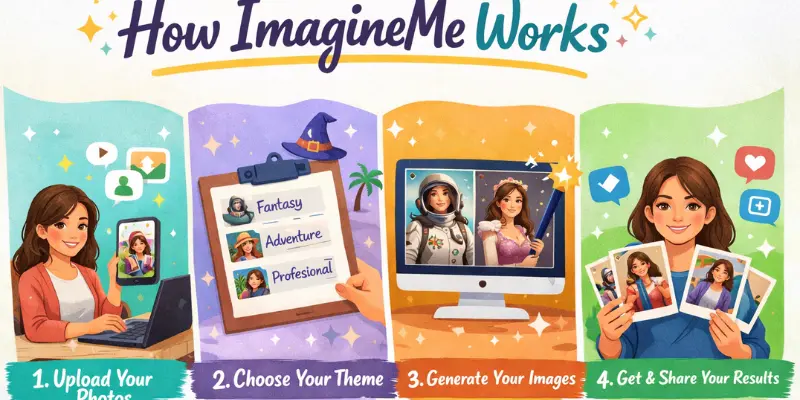
I use ImagineMe when I need fast and clear visuals. The process feels simple, even if you try it for the first time. In 2026, the tool works smoothly and gives results within seconds.
- Open the ImagineMe website and log into your account.
- Type a clear description of the image you want to create.
- Upload a photo if you want a custom portrait or face-based image.
- Choose a style such as realistic, cartoon, or cinematic.
- Click the generate button and wait a few seconds.
- Review the image and download it if you like the result.
- Regenerate or adjust your prompt if you want small changes.
Use Cases of ImagineMe
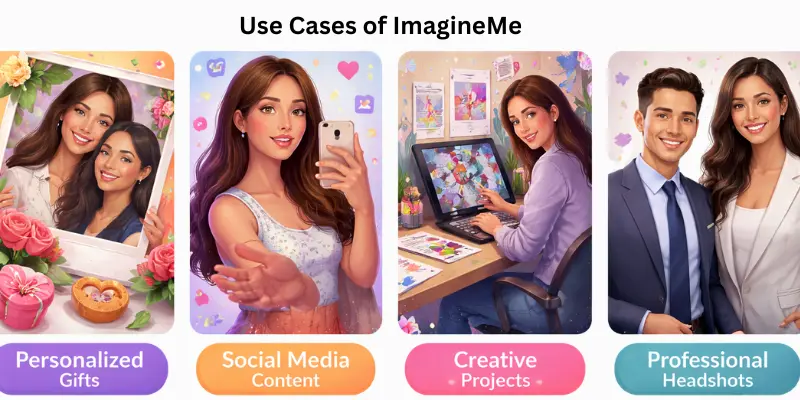
I use ImagineMe for many creative tasks every week. It saves me time and helps me create visuals without hiring a designer. In 2026, many creators and small brands rely on it for fast and clean image work.
- Social media posts create eye-catching images for Instagram, Facebook, and TikTok.
- YouTube thumbnails design bold and clear thumbnails that attract clicks.
- Website banners build professional hero images for landing pages.
- Product mockups show product ideas in realistic settings before launch.
- Personal branding create custom profile pictures and portfolio visuals.
- Blog graphics design featured images that match article topics.
- Marketing ads produce ad visuals for paid campaigns quickly.
- Gift designs create fun custom portraits for friends and family.
- Storyboards plan visual scenes for videos or short films.
- Print materials design posters, flyers, and simple merchandise graphics.
Who Uses ImagineMe
I see many different people use ImagineMe in 2026. I also use it for quick creative work when I need fast results.
- Content creators use it to design thumbnails, posts, and cover images.
- Small business owners create product visuals and ad graphics.
- Social media managers build daily content without hiring designers.
- YouTubers design custom channel art and video thumbnails.
- Bloggers create featured images for their articles.
- Online sellers make product mockups for listings.
- Students design presentation graphics and creative projects.
- Digital marketers create ad creatives for paid campaigns.
- Freelancers build portfolio samples to attract clients.
- Hobby users create fun portraits and gift designs for friends.
ImagineMe Pricing & Plans
ImagineMe keeps pricing simple so you can start creating right away without confusion. I have used this platform myself, and I like that you only pay for credits when you need them, making it flexible and budget friendly in 2026.
| Plan | Price | Credits | Images per Credit |
| Starter | $5 | 10 credits | 4 images per credit |
| Basic | $10 | 25 credits | 4 images per credit |
| Best Value | $15 | 45 credits | 4 images per credit |
This pricing lets you control cost while generating many unique visuals through credits. ImagineMe deducts credits only after a successful image appears in your gallery, which helps save unused credits.
Pros and Cons of ImagineMe
In this section, we will look at the pros and cons of ImagineMe. I have used this tool personally, and I want to share both what I liked and what could be improved. This will help you decide if it fits your needs.
| Advantages of ImagineMe |
|---|
|
| Disadvantages of ImagineMe |
|---|
|
ImagineMe Alternatives
If you want other tools like ImagineMe, there are several good options you can try in 2026. I have used a few myself, and each one gives a slightly different style or feature set. Some focus more on artistic images, others on realistic photos or quick social media visuals. Exploring these alternatives helps you find the best tool for your project and budget.
These tools also offer similar functions, such as turning text into pictures, customizing styles, and generating visuals fast. While ImagineMe works well for many tasks, alternatives can give you more creative control, different art styles, or free credits. Trying a few options lets you compare results and choose what fits your needs best.
ImagineMe Tips and Best Practices
Using ImagineMe can be easier and more effective when you follow a few simple tips. I have tried these myself, and they help get better results faster and make your images look exactly how you want.
- Start with clear and simple descriptions for your images.
- Experiment with different styles to see what fits your project.
- Use high-quality references if you want realistic results.
- Check and adjust details after generating the image for accuracy.
- Save your favorite settings to use them again for future projects.
- Take your time to review each image before finalizing it.
Conclusion
In this guide, we have covered ImagineMe. While it offers many helpful features, it also has some limits and risks. I recommend using it carefully and focusing on the features that suit your needs the most. You can manage any challenges by testing small projects first and learning as you go. This way, you enjoy the benefits while avoiding issues. Thank you for reading and exploring the details with me.
Don’t skip the next part of the FAQs, I hope you will find something more interesting, so don’t miss it. If you miss it, you may lose something new.
FAQs: ImagineMe
Here are some of the most commonly asked questions related to the ImagineMe:
ImagineMe is a platform that allows you to create digital visuals and designs easily. It helps beginners and professionals make creative projects quickly. Many users enjoy how simple it is to use without needing technical skills.
ImagineMe works by letting you choose templates, customize images, and generate results instantly. You can upload your own ideas or use built-in options. It is designed to make digital creation fast and clear for everyone.
The key features of ImagineMe include customizable templates, easy editing tools, and instant previews. You can create images, designs, and digital graphics in minutes. It also supports multiple export formats to use your creations anywhere.
ImagineMe pricing & plans are flexible for different users. There is a free version to start and paid plans with more templates and high-quality outputs. You can upgrade anytime if you want additional features.
Yes, ImagineMe is very beginner-friendly. It provides simple instructions, ready-made templates, and easy-to-use tools. Even without prior experience, you can create professional-looking designs quickly.
Absolutely, ImagineMe is perfect for social media graphics and posts. You can design banners, stories, and images for platforms like Instagram or Facebook. Many influencers and small businesses use it to save time and look professional.
Yes, there are several ImagineMe alternatives like Canva, Crello, and PicMonkey. These platforms also allow digital creation with templates and tools. You can try each one to see which fits your style best.
ImagineMe works on computers, tablets, and smartphones. You can use it on web browsers or its official app. This makes it convenient to create designs from anywhere, anytime.
Yes, ImagineMe is safe and secure. It follows standard online safety protocols and keeps your designs private. You don’t need to worry about your work being shared without permission.
To use ImagineMe tips and best practices, start with templates and explore editing tools. Test different layouts and colors to find your style. Regular practice will help you create designs faster and more effectively.






- Be Respectful
- Stay Relevant
- Stay Positive
- True Feedback
- Encourage Discussion
- Avoid Spamming
- No Fake News
- Don't Copy-Paste
- No Personal Attacks
- Be Respectful
- Stay Relevant
- Stay Positive
- True Feedback
- Encourage Discussion
- Avoid Spamming
- No Fake News
- Don't Copy-Paste
- No Personal Attacks
