MindVideo AI Review 2026 – Text-to-Video Guide
Published: 10 Feb 2026
Video content now leads online growth, from social media to business ads. Creators want speed, quality, and simple tools that save time. MindVideo AI steps into this space as a smart option for people who want results without stress. It supports AI video generator workflows that match how modern content is made today.
This guide explains how MindVideo AI fits real creator needs. You will see how text to video AI and image to video AI workflows help produce strong visuals fast. We will also cover pricing, features, and use cases so you can judge if this free AI video generator works for your goals.You can learn more tools about creating professional thumbnails quickly by checking out our detailed guide on Pikzels AI.
What Is MindVideo AI?
Mind Video AI is an AI video generator that helps you create videos from text or turn images into videos in minutes. You type a short prompt or upload an image, and the system builds a video for you. It works online, so there is no video editing skills needed.
This platform works as a free AI video generator for beginners and paid users. It supports both text to video AI and image to video AI creation. Many creators use it as an AI video maker online for fast results without stress.
How MindVideo AI Works
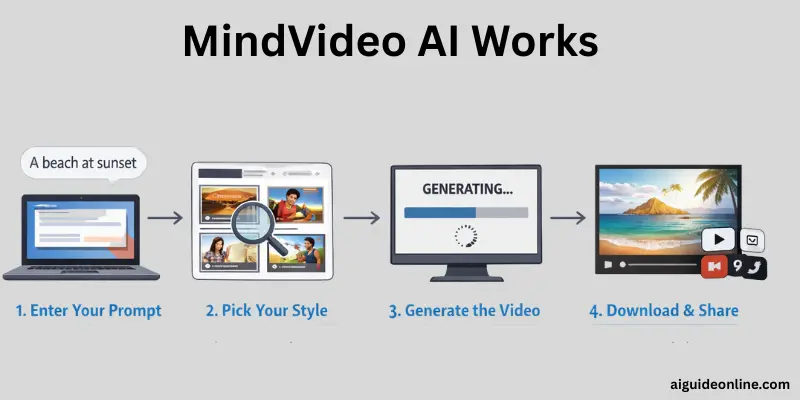
Here’s the thing. MindVideo AI turns simple ideas into video without heavy software or editing skills. You start with just a phrase or a picture and the system does the rest. This section walks you through the real steps a user takes to generate a video using this online tool.
- First, enter a text prompt or upload an image you want to animate. Make sure your description is clear so the system interprets your idea well.
- Second, choose output settings such as resolution, video length, and style preferences. You can pick different AI engines or effects that match the mood you want.
- Next, select from the available models like Kling, Runway, Luma, or others to define the style. Each model processes your input a little differently to shape video visuals.
- After that, click the “create” button to start the generation. The system will build your video based on your prompt and options.
- Finally, once your video is ready, you can preview it and download it for use on platforms like YouTube or TikTok. You can delete your files anytime if you want to protect your privacy.
Key Features of MindVideo AI
Here are the key features of MindVideo you need to know. These points are based on real tool functions and match what’s shown on the official site and trusted sources.
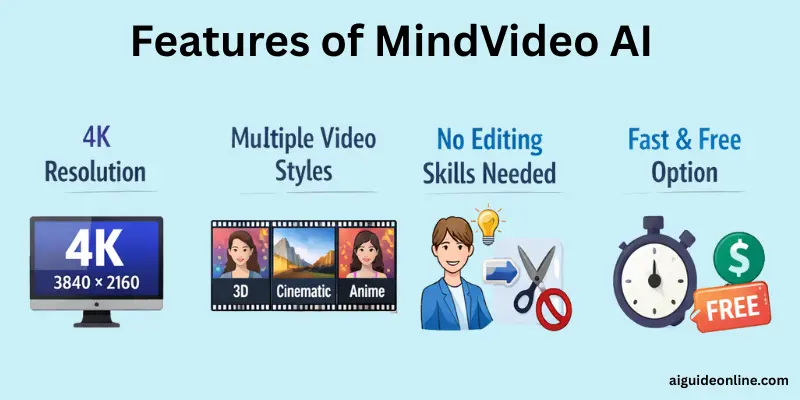
- Free AI text to video generator lets you turn simple text into moving clips quickly.
- AI image to video animation can make still photos come alive with motion.
- Offers a range of AI models like Kling, Runway, and Luma in one tool.
- Supports high-quality output up to 4K for crisp visuals.
- Works without waiting in a queue, so you get results fast.
- Includes special effects like AI Kiss and AI Hug to add fun motion.
- The design is easy to use on both phones and computers.
- You can make high-resolution and detailed videos without installing software.
Video Quality and AI Model Performance
MindVideo AI lets you export videos at high resolutions up to 4K, giving you crisp frames and clear visuals that look sharp on phones, desktops, and large screens. This high quality makes it suitable for social shorts, marketing clips, and professional showcases without obvious blur or pixelation.
What makes MindVideo strong is that it offers several powerful AI video models in one platform rather than sticking with just one. You can choose from Runway, Kling, Luma, Veo 3, Seaweed, and more, each with its own output style and motion behavior. Some models favor smooth cinematic motion, while others give more stylized or playful effects, so your video’s look can change depending on which model you pick.
MindVideo AI Pricing and Free Plan
MindVideo AI gives users both a free plan and paid options so everyone can start making videos. The plans vary in credits and quality, letting creators choose what fits their needs and budget.
| Plan | Monthly Cost | Credits | Video Quality / Perks |
| Free Plan | $0 | Limited | Basic access, HD output |
| Lite Plan | $9.9 | 500 | More credits, faster rendering |
| Pro Plan | $14.9 | 1200 | Full HD and priority access |
| Max Plan | $43.9 | 3000 | Up to 4K output, no watermarks |
MindVideo AI Use Cases
Use Cases of Mind Video AI shows how different creators, businesses, and learners can benefit from this tool. It’s built to help people who want fast, clear video content without spending hours on editing or hiring professionals.
- Make social media shorts like TikTok clips or Instagram Reels from text prompts or a single photo, which boosts engagement.
- Produce product demo videos by turning static images into moving visuals that highlight features and help market products.
- Create animated marketing content for ads and brand campaigns to attract attention and increase visibility.
- Build educational videos that explain ideas or lessons visually, making learning more engaging.
- Animate illustrations or story panels for artists and storytellers to present concepts or pitches in an animated format.
- Generate pitch visuals for creative projects like comic panels or concept art to show to clients or publishers.
- Craft branding clips for e‑commerce or small business promos using text descriptions tied to products.
These use cases cover a wide range of needs, from entertainment to business and education, showing how MindVideo AI works for many types of users.
Pros and Cons of MindVideo AI
In this section, we will look at the pros and cons of MindVideo so you can decide if it fits your video needs. This tool has strong points that help many creators, but it also has limits you should know before using it.
Advantages of MindVideo AI
Here are the main benefits that many users appreciate:
- Makes videos fast from simple text or images
- Works without heavy editing skills or expensive software
- Offers multiple styles and models in one place
- Supports high resolution up to 4K output
- Free plan lets you start without paying
- No waiting queues for video generation
- Good for short social clips and promo content
Disadvantages of MindVideo AI
Here are some drawbacks you might encounter:
- Some video styles may look less polished than manual editing
- Limited fine editing tools after creation
- Credits may run out quickly on heavy use
- Advanced controls are less detailed than pro software
- Model results can vary in consistency
- Lower output quality on free plans than paid tiers
MindVideo AI vs Other Text-to-Video Tools
Below we compare MindVideo AI vs other text‑to‑video tools so you can see the differences in features, quality, and ease of use. This helps you pick the best option for your video goals.
| Feature | MindVideo AI | Other Text‑to‑Video Tools |
| Text‑to‑video creation | Yes | Yes |
| Image‑to‑video animation | Yes | Some tools |
| Multiple AI models in one place | Yes | Rarely |
| High resolution up to 4K | Yes | Depends on tool |
| Free plan available | Yes | Some tools |
| No editing skills needed | Yes | Varies |
| Instant generation | Yes | May have queues |
| Mobile and desktop access | Yes | Varies by platform |
Who Should Use MindVideo AI
MindVideo AI works well for anyone who needs to make video content quickly without expert editing skills. It fits creators, marketers, and small business owners who want simple, fast, and high‑quality video results.
- Beginners and hobby creators who want to make videos without editing software.
- YouTubers and short‑form creators needing fast clips for platforms like YouTube Shorts or TikTok.
- Small business owners turning product images into promotional videos.
- Social media marketers creating animated visuals for campaigns with limited time.
- Educators and trainers making simple explainer videos or learning visuals.
- Freelancers and creative professionals delivering quick video projects to clients.
Tips to Get Better Results
Tips to Get Better Results shows simple steps that help your MindVideo AI output look clearer, more fitting, and more engaging. Most improvements come from how you write your prompt and prepare the content before generating the video.
- Write clear, descriptive prompts that include subject, style, and environment for better video direction.
- Use a structured prompt with details like scene, lighting, and motion to help the AI understand your goal.
- Pick the right aspect ratio based on where you plan to share the video (vertical for TikTok, horizontal for YouTube).
- Test short clips first, then extend length once you like the style and pacing.
- Choose high‑quality images if you’re using image‑to‑video to get smoother motion and clearer scenes.
- Add engaging music or background audio to enhance mood and viewer involvement.
- Keep text concise in videos so the message is easy to follow and doesn’t feel crowded.
Conclusion
We’ve covered everything about MindVideo AI, from how it works and its key features to pricing, use cases, and who can benefit most. It’s clear that this tool helps creators, businesses, and educators make high-quality videos quickly and efficiently.
If you’re looking to save time and still produce great content, I highly recommend giving MindVideo AI a try. It can really simplify video creation without needing extra software or editing skills. Keep exploring, guys, and stay tuned for more helpful guides to boost your video projects!
FAQs
Here are people commonly ask questions about MindVideo AI:
MindVideo AI is used to make videos from text or images without heavy editing tools. You type a prompt or upload a picture and it turns them into animated clips. This helps content creators save time and effort. It’s great for social media videos and quick promos.
You enter a short description or upload an image you want to animate. Then you choose a style or model and let the system process it. In seconds, you get a video you can download. There’s no need to learn complex editing software.
Yes, MindVideo AI offers a free plan that lets you try basic video creation. The free plan has limits on credits and video length. You can upgrade if you need more features or higher quality. The free option is good for testing the tool first.
You can make short clips like social media reels or slideshows from text prompts. It also turns still images into moving visuals. Some creators use it for ads, tutorials, or creative shorts. The tool supports different styles and resolutions.
Yes, MindVideo AI is easy to use even if you’ve never edited videos before. You don’t need technical skills to start making clips. The interface is simple and clear to follow. It helps beginners produce video content fast and with good quality.




- Be Respectful
- Stay Relevant
- Stay Positive
- True Feedback
- Encourage Discussion
- Avoid Spamming
- No Fake News
- Don't Copy-Paste
- No Personal Attacks
- Be Respectful
- Stay Relevant
- Stay Positive
- True Feedback
- Encourage Discussion
- Avoid Spamming
- No Fake News
- Don't Copy-Paste
- No Personal Attacks
