Vheer AI: A Complete Guide to Creating Stunning AI-Generated Images and Videos
Published: 19 Jan 2026
Looking to bring your ideas to life with just a few words? Vheer AI is here to make it happen! This free, easy-to-use tool lets you create stunning images and videos instantly from simple text prompts. Whether you’re a content creator, marketer, or just curious about Artificial Intelligence, Vheer AI offers a fun, hassle-free way to generate visuals—no design skills required.
What’s even better? You can start creating right away without signing up or worrying about watermarks. From unique digital art to realistic images, Vheer AI provides a variety of styles and formats to fit your needs, making it the perfect tool for anyone ready to explore the world of AI-powered creativity.
What is Vheer AI?
Vheer is a free, browser-based AI tool that allows users to generate high-quality images and videos from simple text prompts. It uses advanced artificial intelligence to interpret descriptions and produce digital artwork that matches the user’s vision. Whether you’re a content creator, marketer, or just someone who enjoys experimenting with creative AI, Vheer offers an intuitive and powerful solution for generating visuals in seconds.
The platform supports a variety of creation modes, from text-to-image generation to image-to-image transformations, video creation, and much more. The beauty of Vheer lies in its accessibility: there’s no need for an account, no watermarks on images, and users can generate images and videos without restrictions.
Main Features of Vheer AI
The Features of Vheer AI make it a versatile and powerful tool for anyone looking to create stunning visuals. From text-to-image generation to advanced editing options, Vheer offers a wide range of features to help bring your creative ideas to life effortlessly.Here are some feature:
Text‑to‑Image Generator
Vheer’s text-to-image generator allows users to create images based solely on written descriptions. The AI reads your prompt and translates it into a visual representation, making it easy for anyone to bring their ideas to life without any design experience.
You can create everything from digital paintings, pixel art, realistic portraits, fantasy landscapes, and even anime-style characters. Simply type your desired description, adjust some settings like aspect ratio and style, and let the AI do the rest.
Image‑to‑Image Conversion
Vheer’s image-to-image feature lets users upload an existing image and transform it into a new style or setting. This is ideal for anyone looking to stylize a photo or image to fit a particular artistic vision. Whether you’re refining a personal photo or enhancing a design, the image-to-image generator can bring creative flair to your visual assets.
For example, you can upload a regular portrait and apply an anime, watercolor, or sketch-style filter to create something entirely new and unique.
AI Video Creation
Beyond static images, Vheer also offers an AI video creation tool. With this feature, users can transform still images into dynamic videos with motion and effects. This is perfect for creating social media content, marketing videos, or just adding movement to your artwork for greater engagement.
The ability to easily convert images into videos enhances your visual storytelling and provides more engaging content for platforms like Instagram, TikTok, or YouTube.
Extra Tools
Vheer goes beyond basic image generation with several other creative tools. These include:
- Realistic Headshot Generator: Ideal for creating professional-looking avatars or portraits.
- AI Tattoo Generator: Generate custom tattoo designs based on your description.
- AI Logo Generator: Create logos for your brand or business with ease.
- AI Anime Portrait Generator: Bring anime characters to life.
- Image to Video Generator: Convert still images into dynamic video clips.
These tools make Vheer an all-in-one platform for generating a wide range of visuals and assets.
How does Vheer AI Works (Step‑by‑Step)
Vheer’s intuitive interface and simple process make it easy for anyone to create professional-quality visuals. Here’s how to get started:
- Visit the Vheer AI Website: Open the Vheer Text-to-Image Generator directly in your browser. No need to sign up or log in—just go to the website, and you’re ready to start.
- Describe Your Vision: Think about the image you want to create and type a detailed text prompt. For example: “A sunset over a calm beach with palm trees and soft waves.” The more specific you are, the better the AI will understand and generate your image.
- Pick Your Aspect Ratio: Select the aspect ratio that fits your needs. You can choose from options like square (1:1), landscape (16:9), or portrait (4:5).
- Click “Generate”: Once you’ve set your prompt and aspect ratio, click the “Generate” button. In a few seconds, the AI will create an image based on your description.
- Adjust and Download: If you want to change the look, click “Generate” again for a new variation or tweak your prompt for better results. When you’re happy with the image, you can easily download it.
What to Do If You Don’t Like the Image
If the first result isn’t exactly what you had in mind, don’t worry! Vheer gives you unlimited chances to refine your image until it’s perfect.
- Click “Generate” Again: Each time you click “Generate”, the AI will produce a new version of your image based on the same prompt. This lets you experiment with different looks and styles.
- Refine Your Prompt: If the image still doesn’t match your vision, try adding more details to your prompt. For example, if you wanted a more specific setting, you could say: “A sunset over a beach with colorful clouds and birds flying above.”
- Try Different Aspect Ratios: Switching the aspect ratio might help enhance the overall feel of your image. For example, if you’re working on a banner, a 16:9 ratio might work better than a square 1:1.
- Keep Experimenting:There’s no limit to how many times you can regenerate or adjust your image. Feel free to explore different styles, prompts, and aspect ratios until you’re happy with the results.
Choosing the Right Image Generation Mode
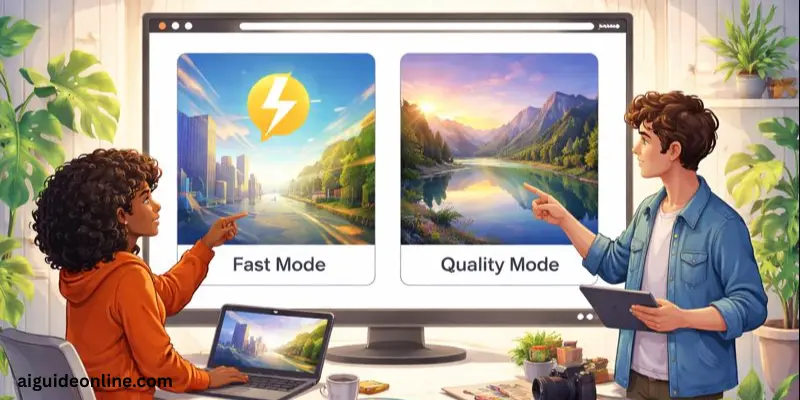
Vheer offers two modes to help you generate images that fit your needs. Choose the mode that suits your priorities:
Fast Mode
If you need quick results for brainstorming or trying out ideas, Fast Mode is perfect. It creates images quickly, so you can experiment and get a basic draft in no time. This mode is ideal when speed matters more than fine details.
Quality Mode
If you’re looking for more detailed and polished images, Quality Mode is the way to go. While it takes a little longer, it delivers sharp, high-quality visuals, making it perfect for final projects or presentations where image clarity is essential.
You can always switch between Fast and Quality modes, so start with Fast Mode to explore different concepts and then switch to Quality Mode for the final image.
Real‑World Use Cases
Vheer AI is a versatile tool with many practical applications, making it a go-to solution for creators, businesses, and artists alike. Its powerful AI features allow you to generate high-quality visuals across various industries. Here are some of the most common ways Vheer AI is used:
- Social Media Content Creation:
Vheer AI makes it easy to create stunning visuals for social media platforms like Instagram, Facebook, Twitter, and more. Whether you need eye-catching images for a post, a dynamic background for a story, or a creative design for a reel, Vheer can generate exactly what you need in just a few minutes. This is perfect for social media managers or influencers looking to engage their audience with fresh, original content.
- Blog Graphics & Thumbnails:
Creating custom graphics for blog posts or website headers has never been easier. With Vheer, you can quickly generate images that align with your blog’s aesthetic, enhancing your articles and improving their appeal. Whether you’re working on feature images, thumbnails, or any visual content for your blog, Vheer helps bring your ideas to life with ease.
- Marketing & Branding Visuals:
Vheer AI is a great tool for marketing teams and businesses looking to design promotional materials. You can generate images for ad campaigns, product mockups, and promotional visuals that match your brand’s tone. Whether you need to create banners for digital marketing or images for print ads, Vheer provides a fast and cost-effective way to design compelling visuals that resonate with your target audience.
- Creative Art Projects:
For artists and creators, Vheer AI is an excellent tool to explore new artistic styles and experiment with different visual concepts. Whether you’re designing digital art, character designs, or illustrations for a personal project, Vheer provides a wide range of creative possibilities. Its ability to transform text prompts into detailed, imaginative visuals makes it perfect for artists looking to expand their creative process.
- Logo and Design Mockups:
If you need a logo or design mockup quickly, Vheer AI can help you generate professional-quality designs in minutes. From minimalist logos to detailed branding concepts, Vheer’s AI can create logos that match your vision. It’s a great option for small businesses, startups, or personal projects where you need a logo without hiring a designer.
- Character / Game Art Design:
Game developers, illustrators, and animators can use Vheer AI to create character designs, scenes, and other assets for video games, comics, or animations. With its ability to generate a variety of visual styles—from realistic portraits to stylized anime characters—Vheer is an ideal tool for bringing your game or animation projects to life. You can quickly create and modify characters, backgrounds, and props to fit your story and gameplay design.
Pros and Cons Of Vheer AI
In this section, we will look at the Benifits and drawbacks of Vheer AI to help you make an informed decision about whether it’s the right tool for you.
| Advantages of Vheer AI |
|---|
|
| Disadvantages of Vheer AI |
|---|
|
Tips for Better Results
Here are some tips to make the best result os vheer ai:
- Use Detailed Prompts: The more specific your description, the better the AI can interpret it. Include details about colors, emotions, styles, and elements you want to see.
- Experiment with Different Aspect Ratios: Depending on your project, a different aspect ratio can dramatically change the image’s composition and impact.
- Regenerate and Refine: Don’t settle for the first result. You can regenerate the image as many times as you need until you’re satisfied.
- Utilize the Image-to-Prompt Tool: If you’re unsure about what to prompt, try the Image-to-Prompt tool to extract a prompt from an existing image.
Conclusion
In this guide, we’ve explored everything you need to know about Vheer AI, from its main features and real-world use cases to its advantages and disadvantages. Vheer AI offers an easy and free way to create stunning images, videos, and other visuals, making it a valuable tool for anyone looking to unleash their creativity.
Personally, I recommend giving Vheer AI a try, especially if you’re someone who needs quick, high-quality visuals without any hassle. Whether you’re a content creator, a small business owner, or just someone looking to experiment with creative projects, Vheer AI can save you time and effort while producing impressive results.
So, folks, stay tuned for more tips and keep learning! You never know what cool tools you might discover next!
FAQs
Yes, Vheer is completely free to use. There are no hidden fees, and you can generate unlimited images and videos without creating an account.
Yes, Vheer allows you to use the generated images commercially, but be sure to check the platform’s terms of service for any specific restrictions.
Yes, since Vheer is a browser-based tool, it can be accessed on mobile devices through your preferred browser.
To create an image, simply type a detailed description, pick the aspect ratio, and hit the “Generate” button. The AI will create the image in seconds.
Yes, you can regenerate an image as many times as you like, allowing you to experiment with different versions and fine-tune the results.
1. Fast Mode generates images quickly, ideal for brainstorming.
2. Quality Mode takes a bit longer but produces more detailed, high-resolution results.
Yes, you can adjust the art style and aspect ratio of your images to suit your needs. Vheer offers a variety of styles like anime, watercolor, pixel art, and more.




- Be Respectful
- Stay Relevant
- Stay Positive
- True Feedback
- Encourage Discussion
- Avoid Spamming
- No Fake News
- Don't Copy-Paste
- No Personal Attacks
- Be Respectful
- Stay Relevant
- Stay Positive
- True Feedback
- Encourage Discussion
- Avoid Spamming
- No Fake News
- Don't Copy-Paste
- No Personal Attacks
