Vizard AI Review 2026: Best Tool for TikTok & YouTube Shorts
Published: 6 Feb 2026
Vizard AI is an AI-powered video repurposing tool that helps content creators turn long-form videos into engaging short clips for social media. Whether you need TikTok video clips or YouTube Shorts video creation, Vizard AI automates the process, saving you time and effort. With its advanced features, this tool makes it easy to generate videos that capture attention and perform well on various platforms.
What sets Vizard AI apart is its multi-platform video optimization, allowing you to tailor videos for different social media channels. From automated subtitling to customizable editing, this tool offers a comprehensive solution for content creators and marketers looking to maximize the impact of their videos across the web.
In this guide, we’ll walk you through Vizard AI’s features, benefits, pricing, and what makes it a standout choice for video content creation. If you want to explore more tools, you can also check out my detailed guide on Chub AI.
What Is Vizard AI?
Vizard AI is an AI-powered video repurposing tool that helps users transform long videos into shorter, shareable clips suitable for social media. It uses advanced AI video clip generation and video editing automation to identify the most engaging parts of videos and create highlights automatically. Whether you are making TikTok video clips, YouTube Shorts video creation, or any social media content, Vizard AI simplifies the editing process and saves you a lot of time.
By automating the video editing process, Vizard AI eliminates the need for manual cutting and splicing of videos. This makes it an essential video marketing tool for content creators, digital marketers, and anyone looking to boost their social media presence with professional-quality clips.
What Sets Vizard Apart?
Vizard tool stands apart from other video editing tools due to its unique features. One standout feature is its highlight detection tool, which automatically identifies the most engaging sections of a video, saving you time from having to search through hours of footage. AI-driven video insights also play a significant role in helping creators optimize content for different platforms. Vizard can adjust videos automatically for multi-platform video optimization, ensuring your clips are the right size and style for each social media network.
Furthermore, Vizard AI integrates seamlessly with platforms like Zoom, YouTube, and TikTok. This makes it easy to upload and publish videos directly to these platforms. With customizable video editing tools, users can tweak their videos to fit their brand’s aesthetic and messaging, ensuring brand consistency in video content across all channels.
How Does a Vizard AI Work?
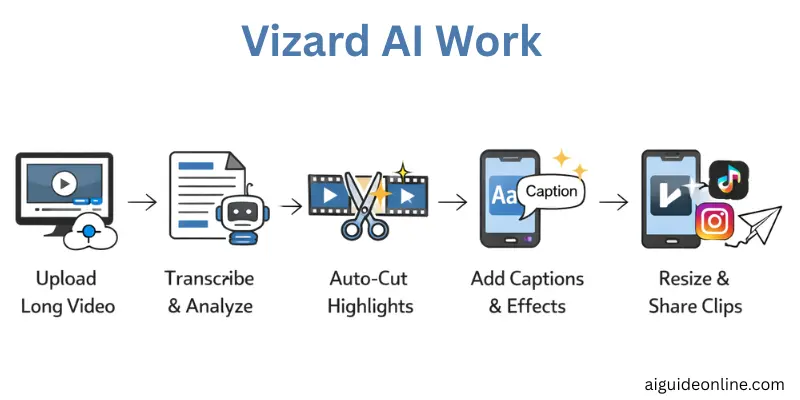
This tool is an AI-powered video tool that analyzes long videos, detects engaging parts, and automatically turns them into short, platform-ready clips with captions and edits.
- You upload a long video or paste a video link and Vizard’s AI begins processing it.
- The AI transcribes the video to text so it can understand and detect key moments.
- It automatically identifies highlight-worthy segments and cuts them into short clips
- Vizard can add smart captions and trendy text styles to make videos more engaging.
- It also resizes, crops, and optimizes clips for platforms like TikTok, Instagram Reels and YouTube Shorts.
- After editing, you can export or share your clips directly to social media.
Use Cases of Vizard AI
Vizard tool helps creators and professionals save time and repurpose video content fast. It works for many people who need short, social‑ready clips from longer videos, and it fits different workflow needs.
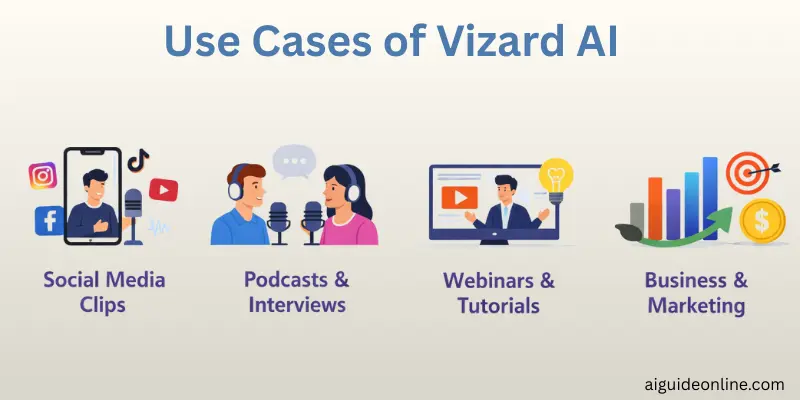
- Content creators and podcasters use Vizard AI to clip long recordings into short, engaging highlights for platforms like YouTube Shorts and TikTok.
- Marketers repurpose webinars, interviews, or ads into multiple short clips to publish across social media quickly.
- Coaches and business owners turn client calls, courses, or presentations into bite‑size videos for branding and teaching.
- Teams and agencies scale video production by generating dozens of clips in minutes instead of hours.
By automating video content repurposing, Vizard AI frees up time for creators and businesses to focus on what matters most—growing their brand and connecting with their audience.
Who Uses Vizard?
Many professionals rely on Vizard AI because it makes creating short, shareable video clips much faster and easier than doing it by hand. This tool helps people in roles where video content plays a big part in engaging audiences.
- Social Media Managers – They use Vizard tool to produce many short clips fast for platforms like TikTok and Instagram so they can keep feeds active and engaging.
- Video Editors – These editors benefit from AI video clip generation and video editing automation, which speeds up work and reduces manual editing time.
- Content Creators – Creators on YouTube, Instagram, and TikTok repurpose long videos into quick highlights that attract more views and shares.
- Marketers and Advertising Managers – They use the tool for social media video creation and video marketing, making short ad clips that help promote brands and products.
- Podcasters – They extract exciting segments from long audio or video podcasts and turn them into bite‑sized clips for social sharing.
- Digital Marketing Specialists – These pros rely on AI‑powered video repurposing to keep up with fast‑moving trends and publish optimized clips across channels.
These use cases show how Vizard AI supports teams and creators by automating time‑consuming video tasks and helping them stay productive.
Key Features of Vizard
When diving into Vizard, you’ll find powerful tools that help turn raw footage into ready‑to‑share clips fast and with little effort. These features support creators and businesses in making polished videos for any platform without heavy editing work.
- AI‑Powered Clip Generation – The system uses smart algorithms to pick out the most engaging moments from a long video so you don’t have to manually search for them.
- Multi‑Platform Optimization – Once clips are created, Vizard AI resizes and reforms them for platforms like TikTok, YouTube Shorts, and Instagram without extra steps.
- Automated Subtitling Tool – The tool produces accurate captions in several languages, making videos easier to watch and understand on silent autoplay feeds.
- Customizable Video Editing – You can tweak fonts, layouts, and effects inside the platform so each clip matches your brand and maintains brand consistency in video.
These powerful tools make Vizard AI a strong choice for anyone who needs fast, polished, and platform‑ready videos without complex editing software.
Pros and Cons of Vizard AI
When people review Vizard AI, many praise how it automates video editing and cuts down hours of manual work. Users often say it saves time and helps them produce more content faster, especially for short‑form social posts.
Pros of Vizard AI
- Vizard’s AI-powered clip generation finds the most engaging moments in your video quickly.
- The interface feels clean, simple, and easy for beginners.
- It’s strong at video content repurposing for platforms like TikTok, Instagram, and YouTube Shorts.
- Automatic subtitles and captions make clips more accessible and professional.
- Users like that it speeds up workflow and eliminates long manual edits.
Cons of Vizard AI
- Some users notice slower processing on longer videos, especially when uploading big files.
- The free or trial version can feel limited for heavy users.
- A few reviewers wish there were more advanced editing tools beyond the automated features.
- Subtitles sometimes need small manual tweaks after generation.
Overall, Vizard AI scores high for ease of use and time savings, but it isn’t perfect for users who want full manual control over their clips.
Pricing of Vizard AI
When you first sign up for Vizard AI, you are placed on the free plan at no cost, giving limited access so you can try the tool before paying. This plan includes 60 upload credits per month, and video exports include a Vizard.ai watermark, with projects expiring after a short time if not saved.
For users who need more power, Vizard offers paid tiers with higher upload limits and advanced features. According to pricing insights, a common entry-level paid plan starts around $14.50 per month and includes more upload credits, watermark‑free exports, and extended storage. There are also plans tailored for businesses with even more upload minutes and collaboration tools.
Here’s a simple view of common Vizard pricing tiers:
| Plan | Key Features | Cost (approx) |
| Free Plan | 60 upload credits/month, watermark, limited exports | Free |
| Creator Plan | More credits, no watermark, 4K exports | ~$14.50/month |
| Business Plan | Larger upload limits, shared workspace | ~$19.50/month |
These pricing options help content creators and marketing teams choose a plan based on how much AI video clip generation and editing they need without overspending.
Vizard Alternatives
If you’re exploring tools beyond Vizard AI for your video tasks, there are many options that offer similar or even broader features for AI video clip generation and social media video creation. These alternatives can help creators and marketers produce content in different ways, depending on their needs.
Klap is one popular choice that works like Vizard AI for turning long videos into viral short clips for platforms like TikTok, Instagram, and YouTube Shorts. It’s known for being easy to use and free to start. WUI.AI goes a bit further by offering fast AI-powered video editing plus automated subtitles and translation in many languages — great for creators who need global reach.
Recast Studio is another top pick, especially for podcasters and long‑form content. It uses AI-driven video insights to create clips, show notes, and social posts — combining multiple content types from a single source. Other solid alternatives include ClipGoat for quick scheduling and viral clips, OpusClip for automated clipping, and many community‑recommended tools like SendShort and Hypenest that bundle AI video tools with extras like scheduling and templates.
How Simple Is Vizard AI Setup?
Getting started with Vizard AI is straightforward because you don’t need to install anything or learn complex software. The platform works right from your web browser so you can begin the setup with just a few simple steps.
To start, you first sign up on the Vizard AI website and choose whether you want to use the free plan or a paid tier. Once logged in, you upload your video file or paste a YouTube link, and the AI begins working almost instantly to generate clips and edits.
Then, with a click of a button like “Get AI clips,” Vizard AI uses smart automation to transcribe, find highlight moments, and prepare short video content ready for export or publishing.
This simple setup process lets beginners and experienced creators alike start producing social‑ready videos without spending time learning a complex interfac
Vizard AI vs Creatify AI: A Detailed Comparison
When comparing Vizard AI and Creatify AI, both platforms offer powerful tools for content creation, but they serve different needs. Vizard AI excels at AI video repurposing, quickly turning long videos into short clips for social media. Creatify AI, on the other hand, offers more creative control, allowing users to manually edit and customize videos.
Vizard AI is ideal for marketers looking for automation and fast content creation, while Creatify AI may be better for users who want more in-depth customization.
| Feature | Vizard AI | Creatify AI |
| Video Editing | AI-driven, automatic clip creation | Hands-on editing and customization |
| AI Avatars | 500+ available | Customizable avatars |
| Pricing | $30 – $60/month | Starts from $39/month |
| Social Media Support | TikTok, YouTube, Instagram | Facebook, Instagram, YouTube |
Why Creatify AI Is the Best Alternative to Vizard AI
When comparing Vizard AI with other tools, many marketers and creators find Creatify AI shines as an alternative because it does more than just repurpose clips from existing videos. Unlike Vizard AI, which focuses on shortening long‑form footage into AI‑generated highlights, Creatify AI can generate fully new ad content from product URLs or text prompts, reducing copyright risks tied to repurposed material.
Creators also appreciate that Creatify AI offers advanced features for ad production and AI‑driven video editing, such as automatic avatar generation, scriptwriting, and batch video creation. Many users report that it supports creating professional‑quality social media ads quickly and at scale, which makes it ideal for small businesses and agencies that need consistent creative output without a large design team.
Conclusion
Vizard AI is a powerful tool that helps users quickly create AI-powered video clips for platforms like TikTok and YouTube Shorts. It offers valuable features such as automated video editing, AI video insights, and multi-platform optimization, saving time for marketers and content creators.
However, alternatives like Creatify AI might be a better option for those seeking more creative control and customization in their videos. Ultimately, whether you choose Vizard AI or another tool, creating video content has become faster and more efficient than ever.
FAQs
Yes, Vizard AI offers a free plan. It gives you limited usage, including 60 minutes of video uploads per month. However, videos on the free plan will have a watermark. To remove the watermark, you need a paid subscription.
Yes, Vizard AI does have a free plan, but it comes with restrictions. You get limited features, like a 60-minute upload credit per month. Videos created on the free plan will include a watermark.
Yes, Vizard AI is easy to use. It’s designed for beginners with a simple interface. Most of the editing is done by the AI, making it quick to get the hang of.
Vizard AI offers both free and paid plans. The paid plans start at around $19 per month. The paid version removes watermarks and gives access to more features, such as more upload time.
Vizard AI saves time by automating video editing tasks. It’s perfect for creators who need to quickly make short, engaging videos. Plus, it works across multiple platforms like TikTok and YouTube Shorts.
Vizard AI uses artificial intelligence to automatically create video clips. You upload your footage, and the AI analyzes it to generate highlights and edits. Then, you can download the finished video.
Alternatives to Vizard AI include Creatify AI for more creative control. Pictory AI is also popular for automatic video editing. These tools offer similar features but with some differences in customization and pricing.




- Be Respectful
- Stay Relevant
- Stay Positive
- True Feedback
- Encourage Discussion
- Avoid Spamming
- No Fake News
- Don't Copy-Paste
- No Personal Attacks
- Be Respectful
- Stay Relevant
- Stay Positive
- True Feedback
- Encourage Discussion
- Avoid Spamming
- No Fake News
- Don't Copy-Paste
- No Personal Attacks
