Winston AI Review: Best AI Detection Tool & How It Compares in 2026
Published: 23 Jan 2026
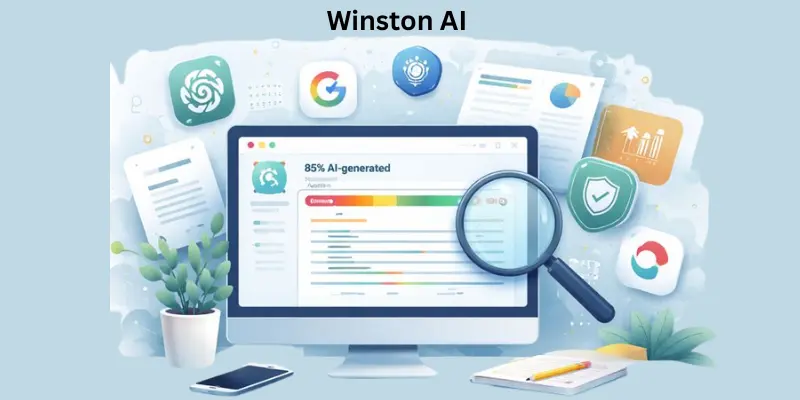
Winston AI is an advanced tool made to help people figure out if a piece of writing was created by a human or by artificial intelligence. It checks text generated by popular AI models such as ChatGPT, Google Gemini, and Claude, and gives a clear indication of whether the content looks AI-written or natural. This kind of tool has become very important because AI writing is everywhere, and it’s not always obvious who — or what — wrote a piece of text.
People use this tool for many practical reasons: teachers and schools rely on it to make sure students’ work is genuinely theirs, businesses use it to protect their brand voice and avoid fake reviews, and content creators check their work to keep it original and human-sounding. Its high accuracy and user-friendly design make it a go-to choice for many professionals.
As you explore this complete guide on Winston AI, you’ll learn how it works, what features it offers, why it matters in today’s digital world, and how it compares to other AI-detection tools. By the end, you’ll understand not just what Winston AI does, but how to use it effectively for your needs. If you want to learn more about related tools, check out my complete guide on Hammer AI.
What Is Winston AI?
Winston AI is a web-based tool that helps you check whether a piece of writing was created by a human or generated by artificial intelligence like ChatGPT, Gemini, or Claude. It uses advanced detection technology to analyze text and give a clear score showing how likely the content was written by AI, making it easier to spot machine-generated writing.
People like teachers, writers, and publishers use Winston AI to make sure content is original and trustworthy. Besides checking for AI-generated text, the platform also includes features such as checking for plagiarism and even detecting AI-generated images — all designed to help maintain content quality and authenticity.
Key Feature of Winston AI
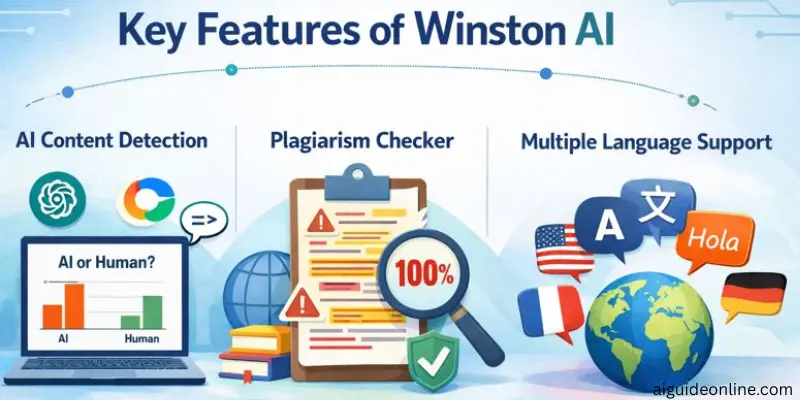
This tool is a powerful content verification platform that helps users check if text was written by a person or generated by AI. It combines multiple tools like AI content detection and plagiarism checking to help ensure content originality and authenticity.
AI Content Detection
Winston AI’s AI content detection feature analyzes your text to decide whether it was likely written by a human or produced by an AI model. It supports detection of content from major LLMs like ChatGPT, Gemini, and Claude, and gives instant results with confidence scoring.
Plagiarism Checker
This tool scans your content across billions of web pages and databases to find any matches or duplicated text. It highlights the parts of your text that match other sources and helps you see where citations or edits are needed.
Multiple Language Support
Winston AI’s detection and verification tools work with many languages, including English, French, Spanish, Portuguese, German, Dutch, and Chinese (Simplified). This makes it helpful for users working with content in different languages.
Reporting and Analytics
After analysis, Winston AI provides detailed results that show how likely your text is human-written or AI-generated. These reports include confidence scores and breakdowns that help you understand the authenticity and originality of your content.
How Winston AI Works
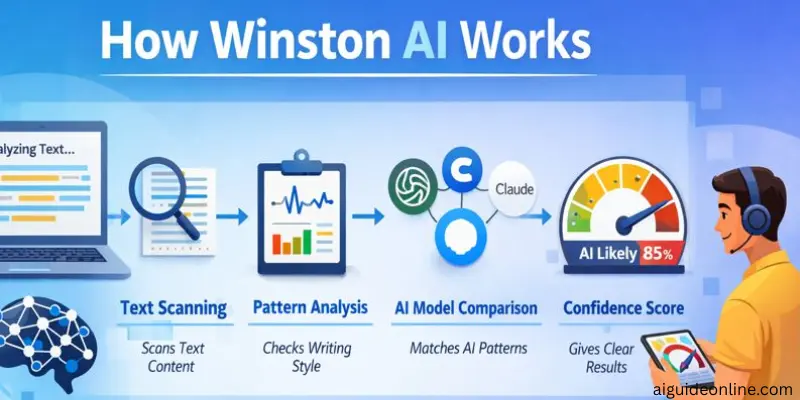
This tool analyzes text to determine whether it was written by a human or generated by AI, using trained models and pattern recognition. It combines advanced natural language processing and machine learning to give users clear insights into content authenticity.
- Detection of AI-generated text: Winston AI scans text and uses advanced algorithms trained on large datasets of AI and human writing to see if it matches patterns typical of AI tools.
- Pattern and language analysis: The system looks at linguistic patterns, structure, and statistical features to estimate whether content is likely AI-generated or human-written.
- Machine learning models: It uses machine learning to continuously improve detection by comparing input text to known human and AI examples.
- Plagiarism check integration: This tool also performs plagiarism scanning across billions of online sources to find duplicate or copied content, adding another layer of verification.
- Multi-model recognition: The tool supports detection of text from major AI models like ChatGPT, Claude, and Gemini, helping it identify content from different generators.
- Instant results and scoring: After scanning, Winston AI provides users with scores and indicators showing how likely the content is AI-generated, making interpretation straightforward.
Plans & Pricing
This tool uses a credit-based pricing system and offers a free trial plus several paid plans to suit different needs — from individuals to teams. You pay for credits that let you scan text or images using Winston’s detection tools.
Free Trial
- Price: $0 (free)
- Credits: 2,000 credits for 14 days
- What you get: Access to basic AI content detection and AI image/deepfake detection.
- Best for: Trying Winston before paying — great for small tests or occasional checks.
Essential Plan
- Price: Around $10–$18 per month
- Credits: ~80,000 credits per month
- Features: AI content detection, AI image detection, writing feedback, advanced plagiarism detection, support, and report downloads.
- Best for: Individuals or small projects.
Advanced Plan
- Price: ~$16–$29 per month
- Credits: ~200,000 credits per month
- Features: Everything in Essential plus more credits and ability to invite up to 5 team members.
- Best for: Small teams and moderate usage.
Elite Plan
- Price: ~$26–$49 per month
- Credits: ~500,000 credits per month
- Features: All Advanced features plus large credit allowance and unlimited team members.
- Best for: Larger teams, frequent users, and heavy content scanning.
Winston AI: user experience
Many people find Winston AI easy and smooth to use for checking whether content was written by a human or an AI. Its interface is straightforward, so even if you’re not tech-savvy, you can upload or paste text and get results quickly without confusion.
Users and reviewers often praise this tool for its accuracy and clarity when identifying AI-generated text, with many saying it does a solid job compared to other tools. This makes it feel like a reliable choice for students, writers, and professionals who care about content authenticity.
On review sites like Trustpilot, people generally give Winston AI positive feedback, saying it delivers clear results and consistent performance — though not every experience is perfect, most users seem satisfied with how the tool works.
However, some users on discussion forums report occasional mis-flags, where human-written essays get marked as having AI content, especially when the writing is edited or polished. That shows Winston AI isn’t flawless, but these reports are not the most common.
Overall, the user experience with Winston AI tends to be seen as smooth and helpful, with most people appreciating its accuracy and ease of use even if there are occasional hiccups.
How to Use Winston AI (Step-by-Step)
Using Winston AI is straightforward and doesn’t take long to learn. You can upload or paste your text, start a scan, and see results in seconds — even if you’re not very tech-savvy.
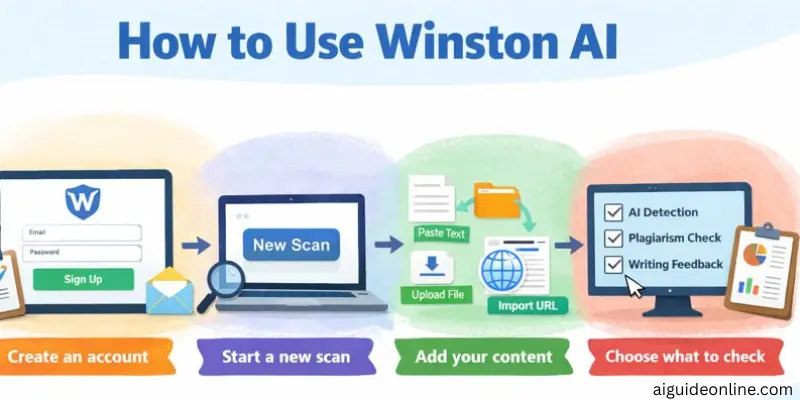
- Create an account: Go to the Winston AI website and sign up with your email to start. You’ll need to log in before you run any scans.
- Start a new scan: After logging in, click the “New scan” button on the dashboard to begin.
- Add your content:
- Paste your text directly into the editor,
- Or upload a file (like a DOCX or image with text),
- Or import a webpage using its URL.
- Choose what to check: Before scanning, select the features you want — such as AI content detection, plagiarism check, or writing feedback. Winston will show the credit cost for each choice.
- Run the scan: Once everything is set, hit the Scan button to analyze your text. Winston will start working and show results quickly.
- See your results: Winston AI displays an AI score, showing how likely the text was written by AI or a human. You may also get a prediction map highlighting parts of your text.
- Download or save: If you’re on a paid plan, you can download or save detailed reports for later use.
Pros & Cons of Winston AI
In this section, we look at the advantages and disadvantages of using Winston AI. This will help you quickly understand where the tool performs well and where it may fall short.
| Advantages of Winston AI |
|---|
|
| Disadvantages of Winston AI |
|---|
|
Who Should Use Winston AI?
Winston AI is a content checking tool built to help people find out whether text was written by a human or generated by AI. Because of its accuracy and reporting features, it fits well in many real-world situations where original, trustworthy writing matters.
- Educators and Schools – Teachers, professors, and academic staff can use Winston AI to check students’ essays and assignments for AI-generated content. This helps maintain academic integrity by ensuring the work submitted is genuinely written by students.
- Writers and Content Creators – Bloggers, freelance writers, and authors who want to be sure their content is truly original can benefit from Winston AI. It helps verify that text isn’t mistakenly identified as AI-generated and keeps writing authentic.
- Publishers and Editors – People working in publishing or editorial roles can use this ai tool to evaluate submitted manuscripts, articles, or reports. This adds a layer of quality control before content goes live or into print.
- Businesses and Marketing Teams – Marketing professionals and business owners who produce public content — like website copy, newsletters, or social posts — can use Winston AI to make sure their materials have a human voice and are not mistakenly flagged as AI content.
- SEO and Online Professionals – Website owners and SEO specialists can benefit from checking content before publishing. Search engines may flag AI content, so confirming originality with Winston AI helps protect rankings and audience trust.
Winston AI vs. Alternatives
While Winston AI is a strong tool for detecting AI-generated content, it isn’t the only option out there. If you want to compare features, accuracy, or pricing, it helps to look at other popular AI detection tools side by side before choosing the one that’s right for you.
- Winston AI vs. GPTZero: Winston AI and GPTZero are both well-known AI content detection tools, but they’re built for slightly different users. Winston AI focuses on robust detection with additional features like plagiarism checks and support for multiple file formats, while GPTZero is often highlighted for high accuracy rates and strong performance in educational settings.
GPTZero also offers a free basic option and tools for classrooms or institutions, while Winston AI’s plans are credit-based with broader content scanning options. - Winston AI vs. Originality AI: Originality AI is another competitor in the AI detection space, and its pricing can sometimes be lower than Winston AI, especially on entry-level plans.
While Winston AI offers a mix of AI detection and plagiarism tools with a high claimed accuracy rate, Originality.ai combines AI detection with deep plagiarism checking and readability tools — making it a strong choice if you want a one-stop solution for verifying and improving content. - Winston AI vs. GPTHuman: GPTHuman (sometimes branded as part of broader AI detection tools like GPTZero and similar systems) generally focuses on pinpointing AI text with strong accuracy metrics and integrations for workflow tools.
Compared to Winston AI’s credit-based system and broader ecosystem of features (like OCR scanning and team plans), GPTHuman-style tools usually emphasize highest-possible AI detection precision and may appeal more to users who prioritize accuracy first.
Conclusion
Overall, Winston AI stands out as a solid and reliable AI content detection tool. Based on user reviews and expert testing, it delivers strong accuracy, a clean interface, and a smooth scanning experience, even for users who are not very technical. Most people also find its credit-based pricing flexible enough for different needs.
That said, Winston AI is not perfect. Like other AI detectors, it can sometimes flag human-written content by mistake, especially edited text. Still, for educators, content creators, and businesses who need a practical and easy-to-use AI detection tool, Winston AI is generally seen as a dependable option—as long as results are used with a bit of human judgment.
FAQs
Yes. Winston AI’s detector can check text and tell if it was likely written by tools like ChatGPT, Gemini, Claude, and others by analysing writing patterns. It claims very high detection accuracy for AI-generated content.
There is a free option, you get a free trial with about 2,000 words to scan for 14 days before you have to choose a paid plan.
Winston AI is often better at flagging AI-generated text, while Turnitin is usually seen as stronger for traditional plagiarism detection and academic use. So one is not simply ‘better overall’ — it depends on what you need.
Winston AI promotes itself as having near-top accuracy, some sources report around 99.98% accuracy at detecting AI content — though real-world results vary.
You can trust Winston AI to give you a good indication of whether text looks AI-generated, but like all detectors it’s not perfect and can sometimes mislabel very polished human writing. It’s best to use its results as a guide, not 100% proof.




- Be Respectful
- Stay Relevant
- Stay Positive
- True Feedback
- Encourage Discussion
- Avoid Spamming
- No Fake News
- Don't Copy-Paste
- No Personal Attacks
- Be Respectful
- Stay Relevant
- Stay Positive
- True Feedback
- Encourage Discussion
- Avoid Spamming
- No Fake News
- Don't Copy-Paste
- No Personal Attacks
