Workik AI: Best AI Code Generator for Developers
Published: 15 Feb 2026
Workik AI makes these tasks simpler and faster by generating code snippets, queries, and mock data based on your existing codebase and tech stack. This tool helps developers and teams stay organized while improving productivity.
In this guide, we’ll explore what sets Workik AI apart, its main features, who can use it, and practical ways to implement it for your projects. You’ll also learn about pricing plans, advantages, disadvantages, and alternatives so you can make an informed decision. By the end, you’ll see why many developers rely on this AI code generator for efficient development.
What is Workik AI?
Workik AI is an AI-powered code generator built to help developers create backend code, database queries, and mock data based on their existing codebase, database schema, and tech stack. It uses context-aware assistance to understand project structure and generate output that fits real development needs.
The platform also supports team collaboration, allowing members to work together and share AI-generated code for complex projects. By adapting to different programming languages and database systems, Workik AI helps development teams speed up backend tasks, improve productivity, and manage infrastructure more efficiently.

How Workik AI Works
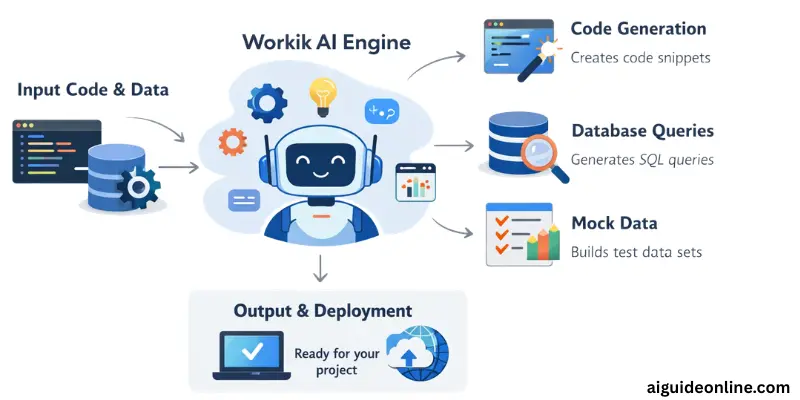
Workik AI helps developers turn project needs into real backend code and related files. It looks at your existing setup and uses that context to produce useful output. Below are the main steps in how it works based on real features found in official sources.
- Analyze your project setup – Workik AI takes your codebase, database schema, and tech stack into account so it knows the structure you are working with.
- Generate backend code – It creates backend code segments that fit your project context, saving you time on routine coding.
- Create database queries – The tool can produce SQL or NoSQL database queries based on your schema for use in development.
- Produce realistic mock data – Workik AI can generate mock data that mimics real datasets to help you test features.
- Assist with debugging and optimization – Based on the context it understands, the tool can help spot inefficiencies or offer optimized suggestions.
- Support team collaboration – You can invite team members to work on the same project and share generated code easily.
Key Features of Workik AI
Workik AI offers tools that help developers handle backend tasks faster and with better accuracy. These features are based on the official feature details you provided and focus on code generation, database support, and teamwork.
- AI-powered code generation: Generates backend code snippets based on your project context and requirements.
- Context-aware assistance: Uses your existing codebase, database schemas, and tech stack to provide relevant AI support.
- Team collaboration: Allows team members to join projects and share AI-generated code.
- Database visualization: Supports SQL and NoSQL schemas and helps visualize database structures with ER diagrams.
- AI-powered documentation: Helps create and maintain documentation for your codebase and databases using AI assistance.
What Sets Workik AI Apart from Other AI Code Generators?
Workik AI stands out by focusing not just on simple code output, but on context-aware support that fits your existing project setup. It adapts to multiple programming languages and closely uses your codebase, tech stack, and database schemas to generate backend code and related files that make sense for your system.
Unlike many basic tools that only produce generic code snippets, Workik AI helps with tasks like optimizing database queries and generating realistic mock data, making it useful for backend developers handling larger, more complex projects. It also supports team collaboration so project members can share AI-generated output and work together more smoothly.
Use Cases of Workik AI
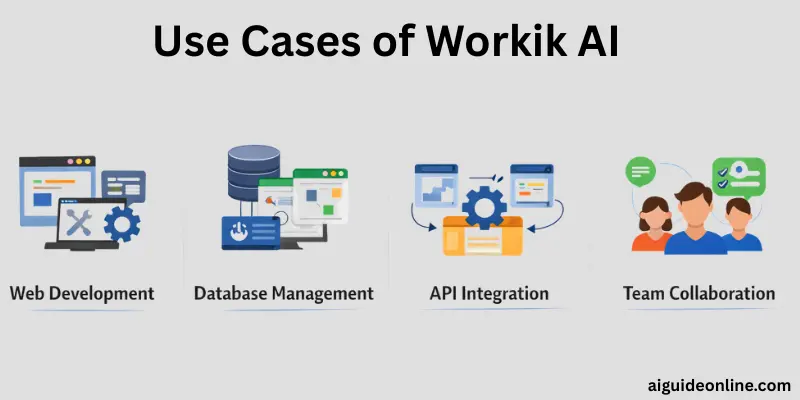
Workik AI is useful in many real development scenarios, especially for backend work and team projects. Below are common ways people can use this tool based on the features and use cases you shared.
- Generate code snippets: Create backend code tailored to your project setup to speed up development.
- Automate development tasks: Let Workik handle routine tasks so developers can focus on higher-level work.
- Optimize code performance: Help improve database queries and backend logic to make code run more efficiently.
- Assist with debugging: Provide suggestions and support that help identify and fix issues in your code.
These use cases make Workik AI valuable for both individual developers and larger teams working on complex apps.
Who Should Use Workik AI?
Workik AI is designed for professionals who build, test, or manage backend systems and data structures in software projects. It helps people in different tech roles work faster and improve code quality by generating backend code, database queries, and mock data based on real project context.
- Web Developers
- Software Engineers
- Software Architects
- DevOps Engineers
- Software Testers
- Test Engineers
- IT Project Managers
- Fullstack Developers
- Systems Analysts
- Database Administrators (DBA)
- Data Engineers
- Backend Software Engineers
- Quality Assurance Engineers
- Software Developers
- Test Automation Engineers
These users benefit from Workik AI’s ability to speed up development tasks, support collaboration, and help generate accurate backend code and data structures.
How to Use Workik AI (Step‑by‑Step Guide)
Workik AI makes backend code generation and related tasks easier by following a clear workflow based on your project setup and needs. Below is a simple step‑by‑step guide on how to use it, based on the features and use cases you provided.
- Sign up and Log In: First, create an account on the Workik AI platform and log in. This gives you access to the dashboard and project tools.
- Set Up Your Project Environment: Once logged in, link your codebase, database schema, and tech stack details. Workik AI uses this context to tailor its output to your specific project.
- Upload or Connect Your Codebase: Add your existing files or connect your repository if supported. This helps Workik AI understand your current setup and generate relevant backend code.
- Generate Code Snippets: Use the code generation feature to request backend code tailored to your needs. You can specify the function or module you want to build, and the AI will provide code snippets.
- Create Database Queries and Mock Data: Workik AI can generate database queries based on your schema and produce realistic mock data to help you test features or build quickly.
- Collaborate with Team Members:Invite teammates to your project workspace so they can view or edit the AI‑generated code and work together on tasks.
- Review and Integrate Output: Go through the generated code, check for any adjustments you want to make, and then integrate it into your actual project environment.
- Use Additional Tools: Take advantage of features like database visualization, documentation generation, and query optimization to further improve your workflow and maintain clarity in your project files.
This practical approach helps you use Workik AI to speed up backend development and support team collaboration without much manual effort.
Workik AI Pricing Plans
Workik AI offers different pricing options so users can choose plans that fit their usage and team size. Each plan comes with a set number of AI tokens, requests, and storage features to support coding, mock data, and collaboration.
| Plan | Price | Key Features Included |
| Trial | Free | 200K standard AI tokens, 50 AI requests first month, 10 requests monthly after, 1M embedding token, 10MB vector data, up to 3 users, AI bots, DB modeling, query generator, mock data generator |
| Starter | $17/mo | 5M standard AI tokens, 1,000 AI requests/mo, 10M embedding tokens, 50MB vector storage, unlimited users, unlimited AI bots |
| Premium | $35/mo | 10M standard AI tokens, 2M advanced AI tokens, 3,000 AI requests/mo, 30M embedding tokens, 150MB vector storage, AI token usage reports, dedicated support |
Pros and Cons of Workik AI
In this section, we will look at the pros and cons of using Workik AI. Understanding these will help you decide if it fits your coding needs and team workflow.
| Advantages of Workik AI |
|---|
|
| Disadvantages of Workik AI |
|---|
|
Best Workik AI Alternatives
If you’re looking for other tools that help with coding, code generation, or developer assistance, several strong options stand out. These tools vary in focus—some offer code completion, others integrate deeply into IDEs or provide full coding environments.
- GitHub Copilot – A popular Artificial Intelligence pair programmer that suggests code and completions based on your context within supported IDEs like VS Code and JetBrains.
- Tabnine – An AI coding assistant that offers code completion and generation adapted to your coding style and workflow.
- Replit Ghostwriter – Built into the Replit platform, it helps generate and complete code across multiple languages and works well for rapid prototyping.
- Claude Code – A coding assistant from Anthropic that enables writing, fixing, and managing code directly from a web interface, simplifying development tasks.
- Continue dev – A free tool mentioned as an alternative for code completion and AI‑driven suggestions that doesn’t always require paid subscriptions.
These alternatives offer a mix of AI coding help, code suggestions, and environment support that can complement or replace parts of what Workik AI does, depending on your needs.
Conclusion
we’ve explored everything about Workik AI, from what it is, how it works, its key features, use cases, pricing plans, and even its pros and cons. If you’re a developer or part of a tech team, giving Workik AI a try can really save time and simplify backend coding tasks, especially for complex projects.
Personally, I’d recommend using it alongside your current workflow to see how it fits, its ability to generate code snippets and assist with databases can be a real boost for productivity. So, buddies, give it a shot, experiment, and keep improving your coding game. Stay tuned for more useful guides!
FAQs
Workik AI works with many programming languages including Python, JavaScript, Java, C#, PHP, Go, and more. It also supports frameworks like React, Django, Spring Boot, and others. You can connect your repository and the tool uses that context to generate code tailored to what you already use.
Yes, you can connect your existing codebase from places like GitHub, GitLab, or Bitbucket. Workik AI reads your files and structure so the code it generates matches your project’s style. This helps keep new code consistent with your current setup.
No, connecting a database is optional. Workik AI still works with just your codebase. But if you do connect a database schema, it can generate queries, mock data, and visual diagrams that make development easier.
Workik lets multiple developers share the same workspace and AI agents. Teams can set roles, permissions, and work together on code generation, documentation, and development tasks. This helps keep everyone on the same page.
Workik AI can generate readable codebase and database documentation automatically. It pulls details from your project files or database schemas and creates structured docs you can share with your team. This helps reduce manual writing and keeps documentation up to date.
Whether Workik AI is worth it depends on how you work and what you need. If you spend a lot of time writing backend code, database queries, or mock data, Workik AI can help you finish those tasks faster. Teams also benefit from its ability to share projects and generate documentation. For solo developers, the pricing and features may be a good fit, but it’s best to try the free plan first and see how it matches your project needs.






- Be Respectful
- Stay Relevant
- Stay Positive
- True Feedback
- Encourage Discussion
- Avoid Spamming
- No Fake News
- Don't Copy-Paste
- No Personal Attacks
- Be Respectful
- Stay Relevant
- Stay Positive
- True Feedback
- Encourage Discussion
- Avoid Spamming
- No Fake News
- Don't Copy-Paste
- No Personal Attacks
